AI Chatbot for HR: Building an Employee Helpdesk That Answers
Updated 1 September 2026
An AI chatbot for HR answers employee questions about leave, payroll, benefits, policy and onboarding directly from your own HR content, cites the clause it used, and hands over to a human when the question is not one a machine should close. It is not a recruiting bot and it is not a rebranded FAQ widget. The difference is retrieval: a real HR assistant reads your handbook, your country-specific addenda and your HRIS, and answers from those rather than from a model’s general sense of what leave policies usually look like.
HR is the most common first deployment for internal AI assistants, and for good reason. Question volume is high, the questions repeat, the content is already written down, and the cost of a slow answer is measurable. It is also the deployment where a wrong answer does damage fastest, because HR answers touch money, time off and employment terms. This guide covers what to build, in what order, and the three failure modes that sink most HR chatbot projects.
Why HR is the right place to start
Three properties make HR unusually well suited to a retrieval-based assistant.
The questions repeat. In most organisations a small number of question shapes account for the majority of HR helpdesk volume: how much leave do I have left, when is payroll processed, how do I claim this expense, what is my notice period, how do I add a dependant to insurance. A long tail exists, but the head is fat and stable, which is exactly the shape that retrieval handles well.
The answers are already written. Unlike engineering knowledge, which lives in people’s heads, HR policy is documented because it has to be. The handbook exists. The leave policy exists. The problem is not that the answer is unwritten; it is that the employee cannot find it, cannot tell which of four versions applies to them, or does not want to read eleven pages to locate one sentence.
The cost of the status quo is visible. HR teams can usually tell you how many tickets they close a month and roughly how long each takes. That gives you a baseline, which is the step most AI projects skip and then regret. If you cannot state the current number, do not start building yet: run a scoped 30-day chatbot pilot and measure first.
The five question types an HR assistant must handle
HR questions are not one thing. They fall into five categories with very different technical requirements, and confusing them is the single most common scoping error. The table below is the one to put in front of your vendor.
| Question type | Example | What it needs | Deploy in |
|---|---|---|---|
| Policy lookup | How many casual leave days do I get? | Document retrieval with citation | Phase 1 |
| Personalised policy | How many do I get, on my grade, in my country? | Retrieval plus employee attributes from the HRIS | Phase 1 |
| Personal record lookup | What is my current leave balance? | Authenticated live API call, no caching | Phase 2 |
| Transactional | Apply three days of leave from Monday | Write access, confirmation step, audit log | Phase 3 |
| Sensitive or judgement | I want to report my manager | Immediate human routing, no AI answer | Never automate |
Most failed HR chatbot projects tried to do rows three and four in month one. Rows one and two are where the volume is, and they need no write access to anything. Ship those, prove them, then earn the right to touch records. The same phasing logic applies to transactional chatbot flows generally.
Permissions are the thing that kills HR chatbots
Every other internal assistant has a permissions problem. HR has a permissions problem with legal consequences.
Consider what sits in a typical HR content store: the employee handbook, which everyone should see; the manager guidelines on performance management, which only managers should see; the compensation bands, which only HR and above should see; and the disciplinary case notes, which almost nobody should see. If your assistant indexes all of that into one vector store and answers from whatever is most semantically similar, you have built a compensation leak with a friendly interface.
The correct architecture enforces access control at retrieval time, not at generation time. That means the permission filter is applied when candidate passages are selected, so restricted content never enters the model’s context in the first place. Filtering the answer afterwards is not equivalent and not defensible in an audit. This is the same principle covered in our guide to enterprise chatbot integrations and SSO: identity has to travel with the query, end to end.
Three checks to run before go-live:
- Log in as a non-manager and ask a question whose answer only exists in the manager handbook. The assistant should say it has nothing, not paraphrase around it.
- Ask for a salary band directly. Then ask for it obliquely, as a hypothetical about a job posting. Both should fail closed.
- Change someone’s role in the HRIS and confirm their retrieval scope changes without a full reindex.
Where HR content actually lives, and why that matters
The handbook is the easy part. The answers employees actually need are scattered, and an assistant that only reads the PDF handbook will be confidently out of date within a quarter.
| Source | What it holds | Refresh cadence |
|---|---|---|
| Employee handbook (PDF or wiki) | Core policy, notice periods, code of conduct | Quarterly |
| Country and entity addenda | Statutory leave, local holidays, local benefits | Annually, plus law changes |
| HRIS | Grade, location, manager, joining date, balances | Live, per query |
| Benefits and insurer documents | Coverage, claim process, network hospitals | On renewal |
| Internal announcements and email | The change that has not reached the handbook yet | Continuous |
| Past HR tickets | How the team actually phrased the answer | Continuous |
That last row is undervalued. A year of resolved HR tickets is the highest-signal training and evaluation material you own, because it shows the real distribution of questions in the words employees actually use, not the words the policy uses. Use it to build your evaluation set before you use it as content.
The conflict problem is the hard one. When the handbook says 18 days and the country addendum says 21, the assistant must not average them or pick the more recent embedding. It needs an explicit precedence rule, encoded as metadata, and it should surface both sources when it applies one. If you cannot express your policy hierarchy as a rule, your employees cannot either, and you have found a real HR problem that predates the chatbot.
Multilingual is not optional for most enterprises
If your workforce spans countries, or spans a corporate office and a factory floor, employees will ask in the language they think in while your policy documents sit in English. Translating the question, searching, and translating the answer back is the naive approach and it degrades badly on the terms that matter most, because policy vocabulary is exactly what machine translation handles worst.
The better approach embeds questions and documents into a shared multilingual vector space, so a Hindi or German question retrieves the correct English clause directly, and generation happens in the asker’s language with the English source cited. We covered the architecture in detail in multilingual AI chatbot design.
The questions it must refuse
A good HR assistant is defined as much by what it declines as by what it answers. Some categories should be routed to a human immediately, with no attempt at an answer and no retrieval logged against the employee’s identity:
- Harassment, discrimination, safety and whistleblowing reports
- Anything touching mental health, medical leave specifics, or disability accommodation
- Disputes about pay already received, or about a performance rating
- Resignation, termination and severance negotiation
- Anything phrased as a legal threat
These are not edge cases to handle later. Build the classifier for them in week one, and make the refusal warm rather than robotic: name the human or channel that will pick it up, and give a response-time expectation. An employee who is reporting harassment and gets a policy excerpt back will not use the tool again, and will tell colleagues why.
How to measure it honestly
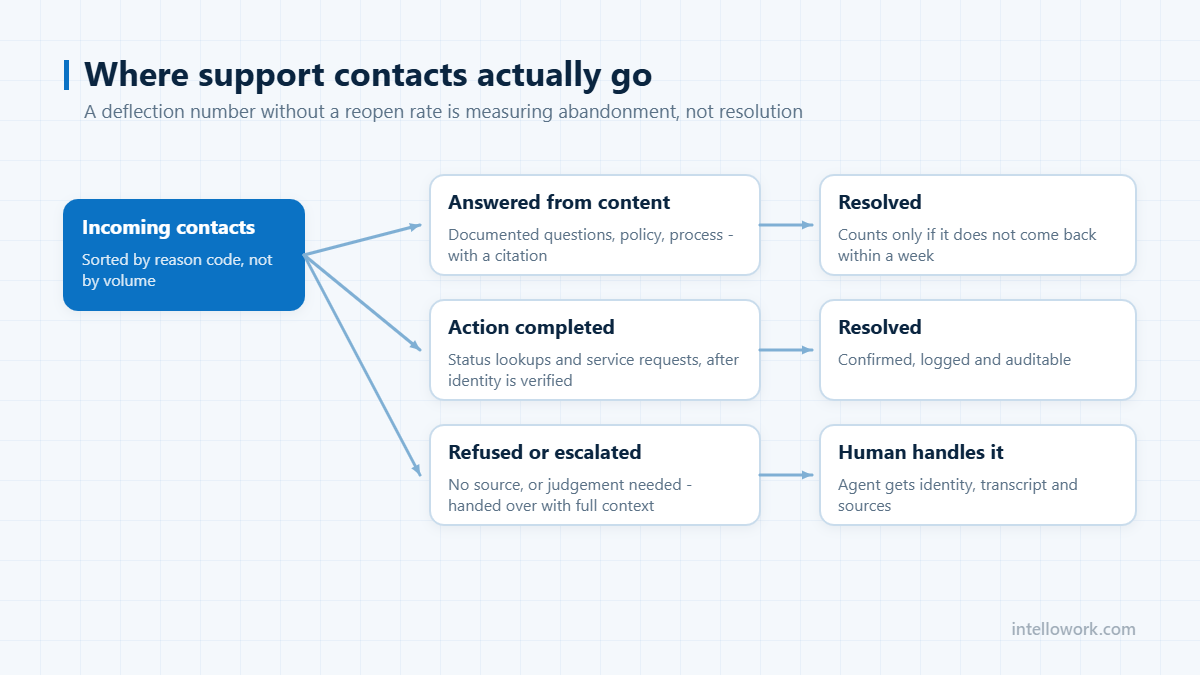
Deflection is the metric everyone reports and the one most likely to mislead. Analysis published by eesel AI collects the current benchmarks: a Gartner finding of 45 percent apparent deflection against only 14 percent genuine resolution, ClarityArc’s 2026 production data showing a median tier-1 deflection of 41.2 percent with a top quartile at 58.7 percent, and a Corebee analysis of more than 50 support teams finding that true deflection runs 15 to 25 percent below the reported figure once 48-hour re-contacts are subtracted.
Those are customer-support numbers, not HR numbers, and you should treat them as a shape rather than a target. The transferable lesson is the correction: subtract the employees who asked the assistant and then raised a ticket within two days anyway. That single adjustment is the difference between a dashboard that flatters you and one you can act on.
| Metric | How to compute it | Why it matters |
|---|---|---|
| True deflection | Sessions with no ticket in the following 48 hours, over total sessions | The only deflection number worth reporting |
| Citation rate | Answers that cite at least one source, over all answers | Uncited answers are the ones that go wrong |
| Honest refusal rate | Answers where the assistant said it did not know | A rate near zero means it is guessing |
| Escalation accuracy | Sensitive questions correctly routed to a human | The compliance-relevant number |
| Repeat usage | Employees who return within 30 days | The honest proxy for trust |
Instrument these before launch, not after. Our guide to monitoring internal AI assistants covers the tooling side.
A 60-day rollout that works
Days 1 to 10 – baseline and corpus. Export twelve months of HR tickets. Cluster them into question types. Pick the top 40 by volume and write the correct answer to each by hand, with the source clause. That is your evaluation set, and it is the most valuable artefact of the whole project.
Days 11 to 25 – retrieval only. Index the handbook, addenda and benefits documents. Wire up SSO so identity travels with the query. Run the 40-question evaluation set. Do not connect the HRIS yet. Target: correct, cited answers on at least 32 of 40.
Days 26 to 40 – personalisation and pilot. Add employee attributes from the HRIS so grade and country-specific answers work. Open to one department of 50 to 200 people. Read every conversation. Fix content, not prompts, where the source document was genuinely ambiguous.
Days 41 to 60 – widen and decide. Extend to the whole organisation on the channels people already use, typically Slack or Microsoft Teams alongside the intranet. Compare true deflection against your day-one baseline. Decide on phase two, which is live record lookups, only if phase one holds.
Build or buy
The retrieval pipeline itself is no longer the hard part. The hard parts are connectors that keep permissions intact, an evaluation harness you trust, and the operational discipline to keep content fresh. If your team has production experience with retrieval-augmented generation and you have engineers to own it for the next three years, building is reasonable. If not, the honest comparison is against the total cost of ownership rather than licence price alone, which we broke down in enterprise chatbot pricing.
Frequently asked questions
What is an AI chatbot for HR?
An AI chatbot for HR is an internal assistant that answers employee questions on leave, payroll, benefits, policy and onboarding using your organisation’s own HR documents and HRIS data, returning a cited answer and escalating to a human when the question is sensitive or outside its scope.
Is an HR chatbot the same as an HR helpdesk ticketing tool?
No. A ticketing tool routes and tracks requests for humans to resolve. An HR chatbot resolves the repeatable subset before a ticket is created, and creates a ticket for the rest. The two work together: the chatbot sits in front of the ticket queue rather than replacing it.
Can an HR chatbot see my salary or personal records?
Only what your own account is already entitled to see, if it is built correctly. Access control must be applied at retrieval time so restricted content never reaches the model. An employee asking about compensation bands should get nothing; the same employee asking their own leave balance should get an authenticated live answer.
How long does it take to deploy an AI chatbot for HR?
A policy-answering assistant over existing documents is realistically 4 to 8 weeks including evaluation and a departmental pilot. Live HRIS record lookups add several weeks because they need authenticated integration and audit logging. Transactional actions such as applying leave should follow later, not first.
What should an HR chatbot never answer?
Harassment, discrimination, safety and whistleblowing reports; medical leave specifics and accommodation requests; disputes over pay already received or performance ratings; and anything phrased as a legal threat. These should route to a named human immediately with a stated response time.
Will it work if our policies are in English but employees are not?
Yes, if it uses multilingual embeddings rather than translate-search-translate. Shared-vector-space retrieval lets a question in Hindi, Tamil or German match the correct English clause directly, and the answer is generated in the asker’s language with the original source cited.
Next step
If you want to see permission-aware HR answering against your own handbook rather than a demo corpus, that is what IntelloWork does: connectors that preserve access control, multilingual retrieval, cited answers and honest refusals. Start with the 40-question evaluation set described above, and judge any vendor, including us, on that.