AI Chatbot for Your Website: The Complete 2026 Guide
Updated 1 September 2026
An AI chatbot for your website should answer questions from your actual content – documentation, pricing pages, policies, help centre – with a citation and an honest refusal when the answer is not there. That is a different product from the pop-up widget that asks for your email and offers three canned buttons. The distinction is not cosmetic: one reduces the work your team does, and the other adds a step in front of a contact form.
This guide covers what a website assistant should do, the mistake that limits most deployments, how setup actually goes, and what to measure.
What a website chatbot should actually do
Four jobs, in descending order of how often they justify the project.
Answer product and policy questions accurately. Shipping timelines, integration support, pricing tiers, refund terms, technical requirements. These are the questions that decide whether a visitor buys, and they are already answered somewhere on your site in a place nobody can find.
Qualify without interrogating. A visitor asking about SSO and data residency has told you something about themselves. Capture that signal from the conversation rather than putting a five-field form in front of the answer.
Hand over cleanly. When the question needs a human, the human should receive the full conversation, the pages the visitor read and what was already answered. A handover that starts with “how can I help you today?” wastes the whole interaction.
Tell you what your site is missing. Every question your content cannot answer is a content gap, ranked by frequency. This is the most undervalued output of a website assistant and the one that compounds over years.
The mistake: treating the website bot as an island
Most website chatbots are configured with their own separate content, their own separate answers and their own separate admin screen. Then the same organisation deploys a WhatsApp bot with different content, and a support assistant with a third set, and within a year the three give three different answers to the same question about refunds.
The correct architecture is one retrieval layer with per-channel behaviour on top: the same indexed content and the same grounding rules, with tone, length and available actions varying by surface. The website assistant can be chattier and link out; the WhatsApp assistant must be terse; the internal one can see more content. One brain, several faces – the pattern described in one chatbot, every channel.
Setup, realistically
| Stage | What happens | Typical effort |
|---|---|---|
| Content ingestion | Crawl the site, plus docs, help centre and PDFs | Hours to a day |
| Content triage | Exclude outdated pages, old blog posts, staging URLs | The part people skip, and should not |
| Grounding and refusal setup | Define what it answers and how it declines | Half a day, high leverage |
| Evaluation | 30 to 50 real questions with correct answers | A day, and it pays for itself |
| Handover wiring | Route to email, chat or CRM with full context | Half a day |
| Placement and launch | Where it appears, and on which pages | An afternoon |
Content triage is where quality is won or lost. A three-year-old blog post describing a pricing model you abandoned will be retrieved and quoted confidently. Crawling everything is easy; deciding what should be authoritative is the actual work.
Placement matters more than design
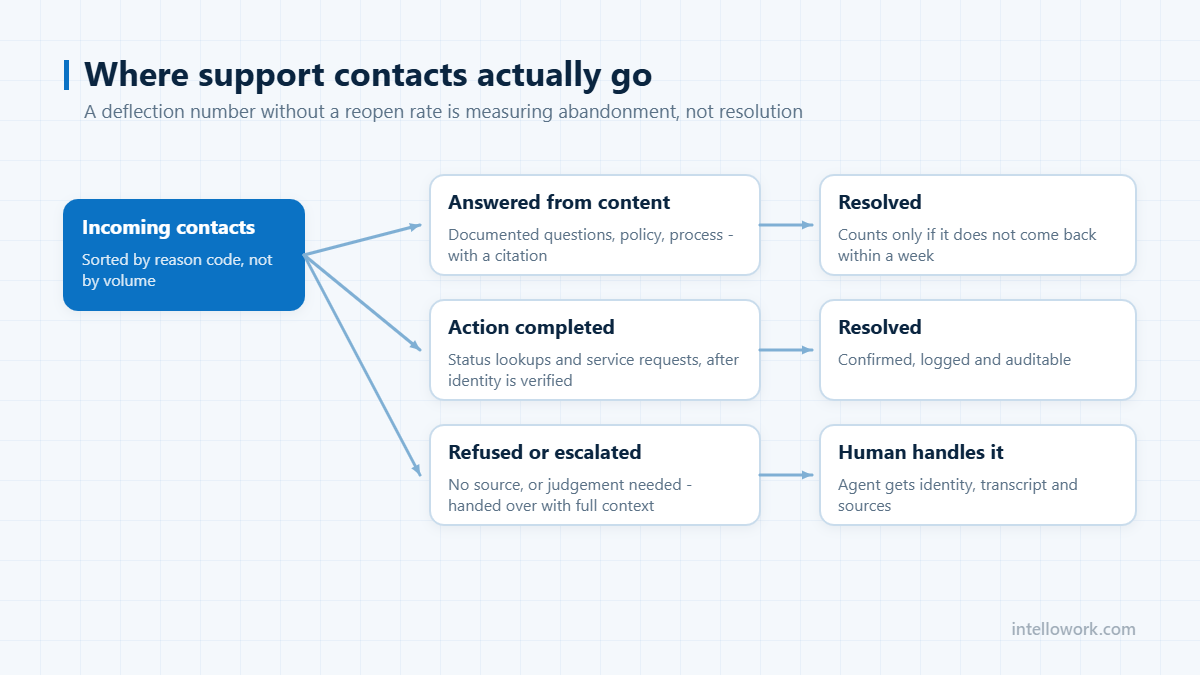
A bubble in the bottom-right corner of every page is the default and the weakest option. Higher-intent placements consistently outperform it: alongside pricing tables, at the point where a documentation page ends, and – the strongest of all – inside the contact form, offering a cited answer before the visitor submits. That is the moment of maximum intent, and it is where deflection actually happens.
Two accessibility points that are routinely missed: the assistant must be keyboard navigable and screen-reader friendly, and it must not trap focus. And if you operate in the EU, note that transparency obligations under Article 50 of the EU AI Act have applied since 2 August 2026 – people must be told they are interacting with an AI system where that is not obvious. A visible label is cheap; forgetting it is not. More on that in our compliance checklist.
Choosing the platform
Five questions separate a real answer engine from a form with a chat skin:
- What happens when the answer is genuinely not in my content? You want a refusal and a route to a human, not a plausible paragraph.
- Does it cite the page it used, and deep-link to the section?
- How is content refreshed when I publish or change a page?
- Can the same content serve WhatsApp, Slack or an internal assistant later, or is this index single-purpose?
- Where does inference run, and is my visitors’ conversation data used for training?
Category context for that decision is in enterprise AI chatbot platforms, and cost models in enterprise chatbot pricing.
What to measure
| Metric | Why it matters |
|---|---|
| Answer rate | Share of questions answered from content rather than deflected to a form |
| Citation rate | Uncited answers are where errors hide |
| Honest refusal rate | Near zero means it is guessing |
| Handover quality | Does the human receive context, or start cold |
| Assisted conversion | Sessions with a chat interaction that convert |
| Content gap list | Questions your site cannot answer, ranked by frequency |
Work the gap list weekly. It is a content roadmap generated by real visitor demand, which is a better prioritisation signal than any keyword tool.
Frequently asked questions
How do I add an AI chatbot to my website?
Ingest your site, documentation and help centre; triage out stale or superseded pages; configure grounding and refusal behaviour; build a 30 to 50 question evaluation set with correct answers; wire handover so a human receives full context; then place it where intent is highest, including inside the contact form. Most of the work is content triage and evaluation, not installation.
Will an AI chatbot give wrong answers about my product?
It will if it is retrieving stale pages or has no refusal path. Exclude superseded content from the index, require citations on every factual claim, and test explicitly with questions your content cannot answer to confirm it declines rather than improvises.
Where should the chatbot appear on the site?
Higher-intent placements outperform a universal corner bubble: next to pricing tables, at the end of documentation pages, and inside the contact form where it can answer before submission. Keep it keyboard navigable and screen-reader accessible wherever it appears.
Do I have to tell visitors they are talking to an AI?
In the EU, yes. Article 50 transparency obligations under the AI Act have applied since 2 August 2026 and require people to be informed they are interacting with an AI system unless it is obvious from context. Regardless of jurisdiction, a visible label is good practice and costs nothing.
Can the same chatbot work on WhatsApp and Slack too?
It should. Use one retrieval layer and one set of grounding rules, with tone, length and available actions varying per channel. Separate indexes per channel is how organisations end up giving three different answers to the same question.
Next step
Write down the 30 questions visitors actually ask you, with the correct answer and the page it lives on. Then test any platform, IntelloWork included, on that set rather than on a demo. If you plan to extend to internal use later, read the chatbot integration guide before you commit to an index.