
How to Integrate an AI Chatbot Into Your Business: The Complete Guide
Updated 1 September 2026
Integrating an AI chatbot into your business is mostly not a chatbot project. It is a content project, a permissions project and a change-management project, with a chat interface at the end. Teams that understand that ship something people use. Teams that treat it as a widget installation spend six months tuning prompts against a corpus that was never going to support good answers.
Here is the sequence that works, and why each step comes where it does.
Step 1: connect the content you already have
Start with what exists rather than writing new documentation. Your wiki, your help centre, your drive, and – the one most people forget – twelve months of resolved support tickets. Ticket history is the highest-signal source you own, because it holds real answers expressed in the words people actually use rather than the words your policy uses.
Then triage. Exclude superseded pages, abandoned project spaces, and the three-year-old blog post describing a pricing model you no longer offer. Retrieval will find that post and quote it with total confidence. Deciding what is authoritative is the actual work; crawling is trivial.
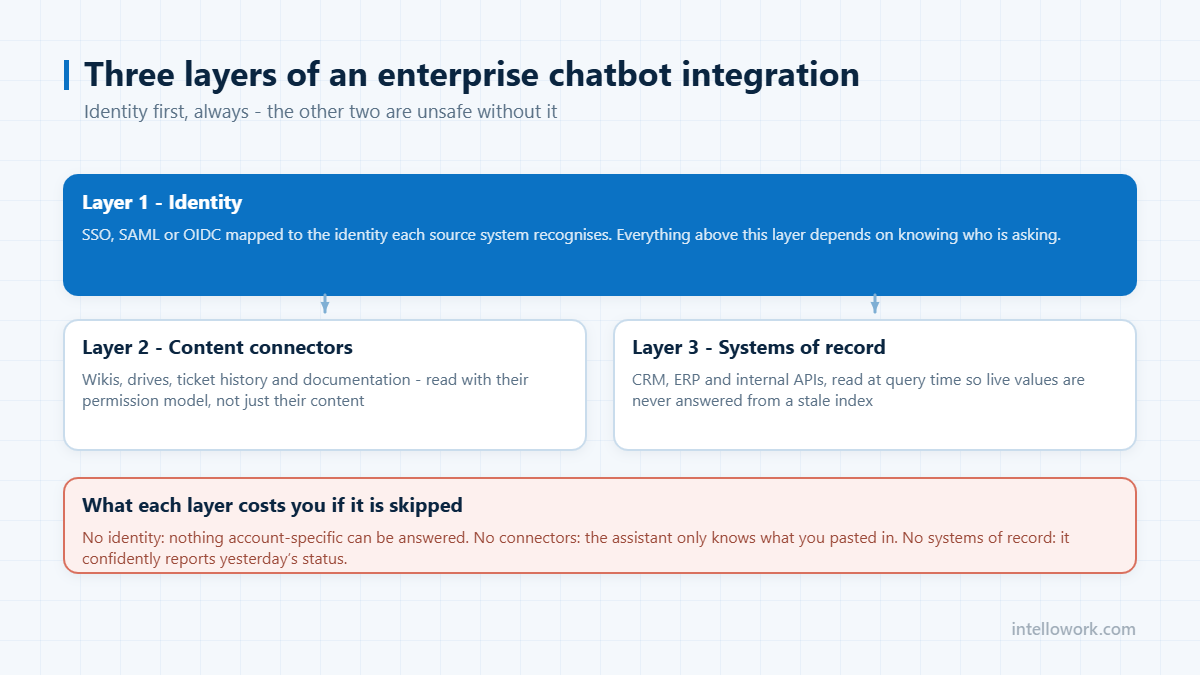
Step 2: decide who may see what, before launch
Permissions are not a phase two item. An assistant that indexes everything into one store and answers from whatever is semantically closest will summarise content people were never entitled to read, without ever showing them the document.
The requirement is that access control is enforced at retrieval time, so restricted passages are never candidates. That needs identity flowing with the query, source-system ACLs mirrored into the index, and a re-sync path so revocations take effect quickly. The detail is in enterprise chatbot integrations.
Step 3: build the evaluation set before you tune anything
Fifty real questions, taken from tickets or search logs, each with a hand-written correct answer and the source it should cite. Plus twenty your content genuinely cannot answer, to test refusal behaviour.
This costs about a week and it changes the whole project, because it turns every subsequent decision into a measurement. Chunking change, embedding change, reranker added, model swapped – run the set, compare the number. Without it you are tuning by anecdote, and the last person to complain sets the roadmap.
Step 4: tune retrieval, not prompts
If the correct passage is not in the retrieved set, no prompt will rescue the answer. Measure retrieval recall separately from answer quality: for each evaluation question, did the right passage appear at all? That number is your ceiling.
| Lever | What it fixes | Typical impact |
|---|---|---|
| Add a reranker | Right passage retrieved but ranked low | Usually the largest single gain |
| Hybrid keyword plus vector | Error codes, policy numbers, product names | Large, if users search identifiers |
| Structure-aware chunking | Clauses severed from their exceptions | Moderate to large |
| Metadata filters | Right answer, wrong version or region | Large in multi-entity organisations |
| Prompt rewriting | Tone and format | Small, and usually where teams start |
Step 5: ship to the channels people already use
Nobody visits a portal to ask a question. Internal assistants belong in Slack or Microsoft Teams and inside the helpdesk ticket form, which is the highest-intent surface you have. Customer-facing ones belong beside pricing tables and at the end of documentation pages. One retrieval layer, per-channel behaviour – see one chatbot, every channel.
Step 6: wire identity and systems of record
Documents tell you what the policy is. Systems of record tell you what is true for this person right now. Add read-only lookups first and live with them for months. Write actions come last, one at a time, behind an explicit confirmation that shows exactly what will happen.
What integrated actually looks like
- An employee asks in Teams and gets an answer citing the policy clause, scoped to their grade and country.
- A question the documentation cannot answer produces an honest refusal, a ticket with full context, and an entry on the content gap list.
- A revoked permission changes what that person can retrieve within minutes.
- Someone owns the gap list and works it weekly, so coverage climbs rather than plateaus.
That last point decides more outcomes than any technical choice. An assistant with no owner degrades quietly as content ages, and the organisation concludes the technology failed.
A realistic integration timeline
The six steps above are ordered by dependency, not by effort. Here is roughly where the time actually goes on a first deployment covering one department.
| Stage | Typical elapsed time | What usually causes the delay |
|---|---|---|
| Connect first two sources | Days | Waiting for admin credentials, not the integration itself |
| Map permissions | 1-2 weeks | Nobody has documented the access model in the source system |
| Build the evaluation set | 3-5 days | Getting subject experts to write ideal answers |
| Tune retrieval to an acceptable score | 1-3 weeks | Content gaps and contradictions, not configuration |
| Ship to one channel | Days | Identity mapping between the channel and the source systems |
| Wire write actions | 2-4 weeks | Approval, audit and rollback design, not the API calls |
Almost none of the elapsed time is model work. Teams that budget for an AI project and get a data-governance project are not unlucky; that is what the work is.
The connector questions that actually matter
“Supports Confluence” on a feature grid can mean anything from a full sync with space restrictions honoured to a scraper that reads public pages. The questions that separate them:
- Does it read the permission model, or just the content? Space restrictions, page-level overrides, group membership – all of it, or none of it.
- What happens on change? Full reindex on a schedule, or incremental updates on a webhook? The difference is felt the first time a policy is corrected at 9am.
- Attachments and embedded files. A large share of real answers live in an attached PDF or spreadsheet, not the page body.
- Deleted and archived content. How quickly does removed content stop being answerable? Stale answers to deleted policies are a compliance problem, not a quality one.
- Rate limits and impact on the source system. A first full crawl of a large instance can be noticed by the team that runs it.
The system-specific version of these questions is in AI chatbot for Confluence and enterprise chatbot integrations for SSO, SAP and Salesforce.
Five integration mistakes worth avoiding
- Connecting everything first. Broad coverage on day one surfaces stale and contradictory content together, and users decide the assistant is unreliable before it has been tuned.
- Treating permissions as a phase two item. Retrofitting access control onto a live index is far harder than building with it, and the exposure in the meantime is real.
- Tuning prompts instead of retrieval. If the right passage is not in context, no instruction fixes the answer. Measure retrieval separately from generation.
- Launching without an evaluation set. Without a graded baseline, every change is a matter of opinion and quality drifts silently.
- Shipping to a new channel instead of the one people use. A well-integrated assistant in a portal nobody opens will lose to a worse one inside Slack or Teams.
Frequently asked questions
How long does chatbot integration take?
A document-grounded assistant over existing content with SSO is realistically 6 to 10 weeks including evaluation and a departmental pilot. Live system lookups add several weeks. Write actions should follow months later, once the read path is trusted.
Do we need to rewrite our documentation first?
No. Launch on the subset you trust and let the assistant’s content gap list tell you what is missing or contradictory, in frequency order. That is a far better prioritisation signal than a full documentation audit, and it produces results in weeks rather than quarters.
What should we integrate first?
SSO, before any content source, so identity travels with every retrieval query. Then one content source done properly with permissions intact, then resolved ticket history, then a single read-only system lookup to prove the live-data path.
Why tune retrieval rather than prompts?
Because retrieval recall is a hard ceiling on accuracy. If the correct passage never reaches the model, no instruction can produce a correct answer. Adding a reranker or hybrid search typically improves results far more than any prompt revision.
Can we integrate a chatbot without copying data out of our systems?
Partly. Retrieval needs an index, and an index is a derived copy of at least some content or its embeddings. What you can control is where that index lives, what it contains, how long it is kept and whether it is used to train anything. Ask for the deployment options in writing – your own tenancy, your own region, or your own infrastructure – and for a deletion guarantee that covers the derived stores as well as the primary one.
How do we handle content that changes every day?
Incremental indexing on change events rather than scheduled full crawls, and a freshness test in your evaluation set: edit a document, ask the question it answers, and measure the lag. For content that changes hourly – stock levels, ticket status, pricing – do not index it at all. Call the system of record at query time and let the assistant read the live value.
What does chatbot integration typically cost?
The licence is usually the predictable part. The variable costs are integration engineering for the systems that do not have a ready connector, permission mapping, and content clean-up – and in most first deployments those together exceed the software cost in year one. Scoping to one department and two sources is the single most effective way to keep the number defensible.
Next step
Build the 50-question evaluation set this week. Then judge any platform, IntelloWork included, on correct-and-cited against your own content. Related: running a 30-day pilot.