
Monitoring Internal AI Assistants: What to Track, and Which Tools Actually Do It
Updated 4 September 2026
Monitoring an internal AI assistant is not application monitoring. Uptime, latency and error rates tell you the service is running; they tell you nothing about whether it is giving good answers. A perfectly healthy assistant returning confident nonsense will show green on every conventional dashboard.
What you need instead is instrumentation of answer quality, permission behaviour and content health – and a person whose job it is to look.
Five things worth monitoring
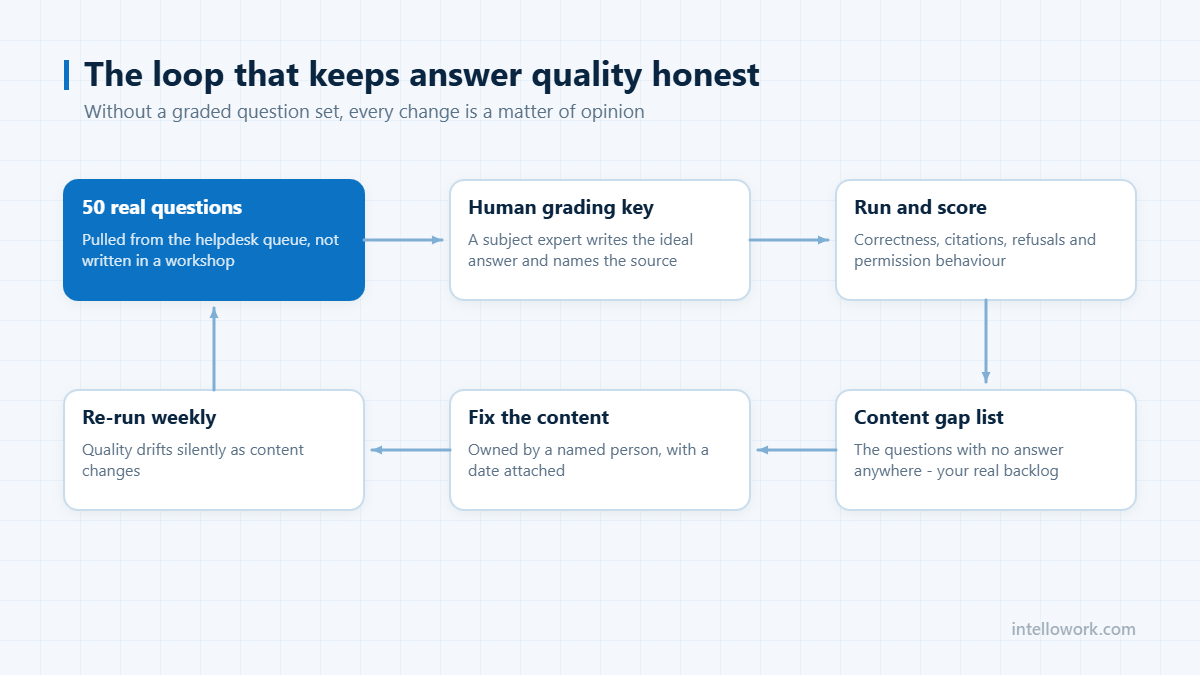
1. What people ask. The question log is the most valuable artefact the assistant produces. Cluster it. The clusters with no good answer are your content roadmap, ranked by real demand rather than by whoever complained loudest. Review weekly, forever – teams that do this see coverage climb for years; teams that do not plateau in month three and conclude the technology failed.
2. Grounding and confidence. For each answer, record the retrieval scores and the share of factual sentences supported by a retrieved passage. That groundedness figure is your hallucination proxy, and it can be computed automatically with a second, cheaper checking model. Track its distribution, not just the mean; a fattening low-score tail is the early warning.
3. Refusals. Count how often the assistant says it does not know. A healthy internal deployment sits somewhere around 5 to 15 percent. A rate near zero is an alarm, not an achievement – it means the system is guessing rather than that it is exceptionally well informed.
4. Permission boundaries. Log which passages were retrieved for which user. Run periodic automated probes: a low-privilege test account asking questions whose answers live in restricted content, phrased directly, obliquely and hypothetically. Alert on any retrieval outside the asker’s scope. This is the control an auditor will ask about, covered further in our security and compliance checklist.
5. Source health. Which documents are actually being cited, and which have not been touched in a year? Two failure patterns hide here: a single stale document being cited constantly, and a whole content area never surfacing because its chunking or metadata is wrong. Both are invisible without a source-level view.
What to log per interaction
| Field | Used for |
|---|---|
| User identity and groups | Permission auditing |
| Question text and channel | Clustering and gap analysis |
| Retrieved passages with document IDs and versions | Incident reconstruction |
| Retrieval scores | Confidence thresholds and drift detection |
| Model and version | Attributing regressions to a change |
| Answer text and groundedness score | Quality trend |
| Outcome: refused, escalated, ticket raised | True deflection |
Balance this against data minimisation. Conversation logs are personal data, and an unbounded record of everything employees have asked HR is a liability you created. Set a retention period, defend it, and make sure erasure requests reach the logs as well as the index.
Which tools do this
Three layers, and most organisations end up with something from each. LLM observability platforms – Langfuse, Arize Phoenix, LangSmith, Weights and Biases and similar – capture traces, scores and evaluation runs. Conventional observability tools handle latency, errors and cost. And the assistant platform itself should provide the permission and source-health views, because only it knows the retrieval scope.
The gap most teams discover late is governance reporting: the view a risk or compliance function needs, showing permission probe results, retention compliance and the audit trail. That rarely comes out of an observability tool and usually has to be assembled.
The weekly review that keeps quality honest
Dashboards drift into decoration unless someone reads them on a schedule and something changes as a result. Thirty minutes a week is enough if the agenda is fixed.
- Sample twenty answers at random from the week and grade them: correct, incomplete, wrong, or correctly refused. Rotate the grader so one person’s judgement does not become the standard.
- Read the ten worst-rated conversations in full. Patterns show up in transcripts that never show up in aggregates.
- List the questions that produced no answer. This is your content backlog, and it is the highest-value output of the whole review.
- Check the escalation queue for handovers that should not have been needed and ones that should have happened sooner.
- Close the loop. Every review ends with named owners for content fixes and a date. Without that step the meeting is theatre.
Alerts worth waking someone for
Most assistant metrics move slowly and belong in a weekly review. A small number indicate something is actively broken and should page a human.
| Signal | Why it matters | Typical trigger |
|---|---|---|
| Retrieval returning nothing | An index or connector has failed; the assistant will start improvising | Empty-context rate jumps above its normal band |
| Refusal rate collapsing | Grounding has broken and the model is answering from parameters | Sudden drop against the previous week |
| Refusal rate spiking | A connector is down, or permissions changed in the source system | Sudden rise, especially in one department |
| Latency at the 95th percentile | Users abandon before the answer lands, and adoption quietly dies | Sustained breach of your stated target |
| Permission-denied on previously allowed content | An access change has broken a whole team’s use case | Any cluster within one group |
Note that both directions of the refusal rate are alerts. A number that only ever gets watched for going up will miss the more dangerous failure, which is an assistant that has quietly stopped checking its sources – the mechanics of that are in stopping AI chatbot hallucinations.
Privacy constraints on assistant logs
Conversation logs are the most useful artefact you have and the most sensitive. Employees ask assistants about salary, leave, health cover and grievances, and those transcripts sit in whatever store you chose in week one.
- Set retention deliberately. Long enough to debug and evaluate, short enough to be defensible. Separate the retention of transcripts from the retention of aggregate metrics, which can live much longer.
- Restrict who can read raw transcripts to a named group, and log the reads. “The AI team can see everything” is not an access model.
- Redact at write time where you can, rather than promising to redact on request later.
- Make deletion reach the derived stores. Vector indexes, evaluation sets and analytics warehouses all hold copies, and an erasure request that only clears the primary log is not complete. This is covered in the DPDP Act consent rules for AI chatbots.
Frequently asked questions
What should we monitor in an internal AI assistant?
Five things: what people ask and which clusters have no good answer, grounding and retrieval confidence, refusal rate, permission boundaries via automated probes, and source health showing which documents are cited and which never surface. Conventional uptime and latency monitoring covers none of these.
How do we measure hallucination in production?
Score groundedness – the share of factual sentences supported by a retrieved passage – automatically with a second checking model, and track the distribution rather than the average. A growing low-score tail is the early warning that content or retrieval has drifted.
What is a healthy refusal rate?
Roughly 5 to 15 percent for a mature internal assistant. A rate close to zero almost always indicates the system is guessing rather than that it is unusually well informed, and a sudden drop should be treated as a regression signal.
How long should we keep conversation logs?
Long enough to reconstruct an incident and detect drift, short enough to limit liability – and defined explicitly rather than by default. Conversation logs are personal data, so the retention period must be documented and erasure requests must reach the logs as well as the index and embeddings.
Who should own monitoring of an internal AI assistant?
Split it. Platform health – latency, errors, connector status – belongs with the team that runs the system. Answer quality belongs with the function that owns the content, because only they can tell whether an answer about leave policy is right. Assistants degrade fastest when quality is treated as an engineering metric and nobody in HR, IT or support is accountable for it.
How many answers should we sample each week?
Twenty random answers plus the ten worst-rated conversations is enough for most deployments, and it is small enough that the review actually happens. The random sample tells you the baseline; the worst-rated set tells you what to fix. Increase the sample when you change the model, the retrieval configuration or a major content source.
Should users be able to flag a bad answer?
Yes, and the flag should capture the retrieved context alongside the answer, otherwise it is unactionable. Expect low volume: most users abandon rather than report. Treat flags as a high-signal, low-recall channel and keep sampling independently rather than relying on them as your quality measure.
Next step
Name the person who reads the content gap list every week before you launch. That single assignment predicts whether coverage climbs or plateaus. IntelloWork surfaces the gap list and permission traces as part of the platform.
The same dashboards also show whether shadow AI use is falling, as our 90-day plan explains.