Shadow AI at Work: What It Costs and How to Replace It
Updated 4 September 2026
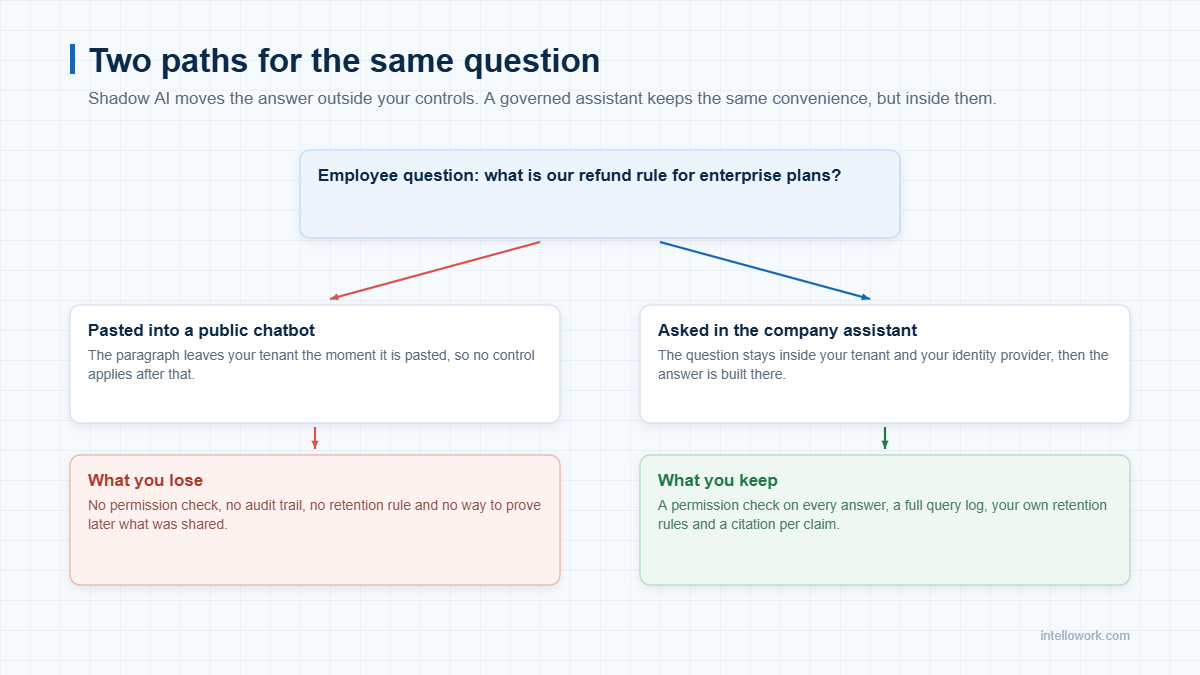
Shadow AI is the quiet use of public AI tools on company work, without approval and without a record. For example, someone pastes a contract clause into a chatbot to get a plain summary. Meanwhile, someone else drops customer rows into a spreadsheet assistant. Both people are trying to do good work, yet the data has already left your control.
In short, this guide covers what shadow AI looks like in practice, what it costs, why bans backfire, and a 90-day plan that actually works. For the wider control set, see our guide to enterprise AI chatbot security and compliance.
What shadow AI looks like on a normal Tuesday
It rarely looks dramatic. In fact it usually looks like someone being helpful under time pressure.
- A support agent pastes an angry customer email in, then asks for a calmer reply.
- Similarly, a recruiter uploads twenty resumes and asks for a shortlist.
- Then a developer pastes a stack trace that carries production identifiers.
- Meanwhile a finance analyst pastes a draft board table to fix the formatting.
- Finally, a manager pastes appraisal notes and asks for softer wording.
None of these people meant to create a risk. However, every one of them moved company data into a system your policies never reviewed.
Why employees turn to shadow AI
Above all, the honest answer is speed. Besides, the public tool is one tab away, and it never asks for a ticket.
Meanwhile the approved route may not exist yet. Where it does exist, it is often slower, harder to reach or simply worse at the task. So people choose the tool that finishes the job, exactly as they always have with file sharing and messaging.
What shadow AI costs
Certainly the cost is not theoretical any more. IBM’s 2025 Cost of a Data Breach report found that breaches involving shadow AI carried roughly USD 670,000 in extra cost, and that around one in five organisations reported such an incident. You can read the summary of IBM’s findings on AI and breach cost directly.
In addition, four other costs land much closer to home.
| Cost | How it shows up | Who feels it first |
|---|---|---|
| Data exposure | Contracts, salaries and customer records sit outside your tenant | Security and legal |
| No audit trail | You cannot prove what was shared, or when | Compliance and auditors |
| Wrong answers | Public tools do not know your policy, so they invent one | Support, HR and sales |
| Duplicated spend | Nine teams buy nine subscriptions quietly | Finance |
| Regulatory exposure | Personal data moves without notice or consent | The board |
Furthermore, the DPDP Act matters here as well, because duties follow personal data rather than tools. Our note on DPDP and AI assistants explains the notice and consent side.
Why banning shadow AI does not work
Of course, blocking the top ten domains feels decisive. Still, it rarely changes behaviour for long.
- The work does not go away. Meanwhile the pressure that caused the shortcut remains.
- Personal devices exist. So people move to a phone, and now you see nothing at all.
- The list keeps growing. New tools appear weekly, so the blocklist ages badly.
- Trust erodes. Moreover, once staff feel policed, they stop reporting what they use.
In short, a ban without a credible alternative converts visible risk into invisible risk. That is a worse position, not a better one.
The data types that leak first
| Data type | Typical trigger | Safer pattern |
|---|---|---|
| Customer records | Summarise this account history | Assistant reads the CRM under the agent’s own rights |
| Contracts | Explain this clause in plain words | Contract library indexed inside your tenant |
| Source code | Why does this function fail? | Approved coding assistant with repository controls |
| Salary and appraisal data | Rewrite this feedback | HR assistant limited to HR content and roles |
| Unreleased plans | Turn these notes into a deck | Internal assistant with retention rules applied |
A 90-day plan to bring shadow AI into the open
Measure first, then offer something better, and only then write rules. That order matters, because rules without an alternative push the habit further underground.
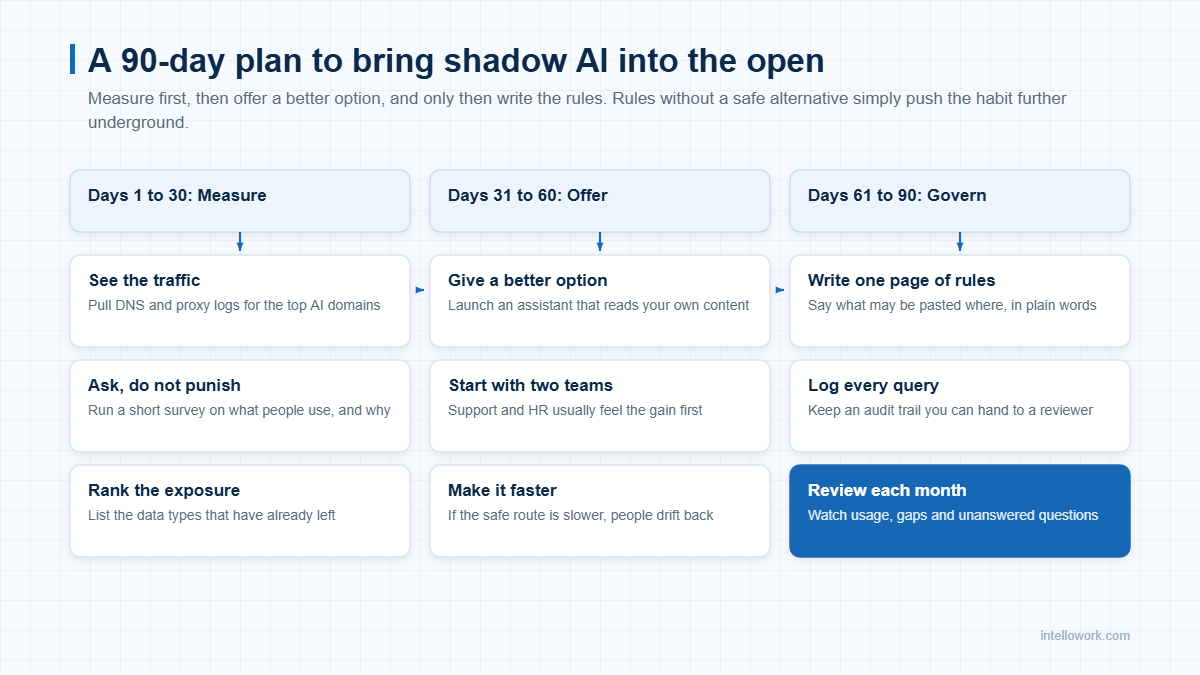
- Days 1 to 30, measure. Pull DNS and proxy logs for the main AI domains. Then run a short, blame-free survey on what people use and why.
- Days 31 to 60, offer. Launch an assistant that reads your own content. Start with two teams, usually support and HR, since they feel the gain fastest.
- Days 61 to 90, govern. Write one page of rules in plain words. Log every query, and review usage each month.
Notice that the alternative arrives before the rules. If the safe route is slower than the public tool, people will drift back within a fortnight.
What a credible alternative has to do
Employees will not trade speed for governance. Therefore the internal option must win on merit.
- Answer from your content. Above all, retrieval must ground every answer in your own documents, not in the model’s memory.
- Enforce permissions. Each answer should use only the files that person may already open.
- Cite the source. A claim without a document link invites doubt, and doubt kills adoption.
- Live where people work. For example, Slack, Teams and the browser beat yet another portal.
- Stay in your region. Keep the index, the embeddings and the model calls where your policy says.
- Be fast. Two seconds feels helpful, while ten seconds feels like a form.
Our write-up on a private ChatGPT for enterprises covers the deployment choices, and the guide to ChatGPT for company documents shows the retrieval pattern in practice.
The one page of rules, written in plain words
To begin with, long policies do not get read. A single page does, especially when it uses examples instead of legal categories.
- Green. Public material, marketing copy and general research. Therefore any tool is fine here.
- Amber. Internal documents that hold no personal data. So use the approved assistant only.
- Red. Customer records, salary data, contracts, credentials and unreleased numbers. These never leave the tenant, whatever the tool promises.
Next, name the approved tools openly. Also give people a simple route to request a new one, because that list will keep changing.
Finally, say who owns the page. Shadow AI grows fastest where nobody is accountable for providing the alternative, so the owner needs budget as well as a title.
Three signs the problem is bigger than it looks
- Your survey and your logs disagree. When staff report far less use than the network shows, fear is shaping the answers.
- Expense claims mention AI subscriptions. Individual receipts usually mean shadow AI has already reached team budgets.
- Nobody can name the approved tool. If people hesitate, then the alternative does not really exist yet.
Still, each sign is fixable, and none of them needs a new committee. They simply need one owner, one page of rules and one assistant that people prefer.
How to measure progress
| Metric | Where it comes from | Direction you want |
|---|---|---|
| Traffic to public AI domains | DNS and proxy logs | Down, steadily |
| Weekly active users on the internal assistant | Product analytics | Up, then flat and high |
| Unanswered questions | Assistant logs | Down, as content improves |
| Self-reported use of outside tools | Quarterly survey | Down, and honestly reported |
| Answers with a citation | Assistant logs | Above 95 percent |
Our note on monitoring internal AI assistants lists the dashboards worth building.
Frequently asked questions
What exactly counts as shadow AI?
In short, any AI tool used for company work without approval or oversight counts. That includes free chatbots, browser extensions and AI features quietly switched on inside tools you already pay for.
How do we find shadow AI without spying on staff?
First, start with aggregate network data rather than individual monitoring. Domain-level traffic shows the scale, and a short survey explains the reasons. Together they are usually enough.
Is shadow AI really a breach risk, or just a policy issue?
In fact it is both. Once data leaves your tenant, you lose retention control and audit trail. IBM’s 2025 report also links these incidents to materially higher breach costs.
Should we block public AI tools entirely?
Rarely. Instead, blocking without an alternative moves the activity to personal devices. Offer a safe route first, then restrict the rest.
Does an internal assistant remove the risk completely?
No, although it does change the shape of the risk. You still need permission checks, retention rules, logging and a clear policy on what may be pasted where.
How long before shadow AI use starts falling?
Typically, teams see a measurable drop within eight to twelve weeks, provided the internal tool is genuinely faster for the top ten tasks.
Talk to us
In short, IntelloWork gives employees the speed they went looking for, inside your own controls. It answers from your content, enforces permissions on every answer and cites the document each time. See how it works at intellowork.com, or ask us to run a two-team pilot.