ChatGPT for Company Documents: Safe Ways to Do It in 2026
Updated 4 September 2026
When people search for “ChatGPT for company documents,” they almost always mean the same thing: we want our team to ask questions in plain language and get instant answers from our own files, policies and docs — the way ChatGPT answers everything else. The problem is that ChatGPT doesn’t know your documents, and the obvious workarounds — pasting content into a chat, uploading files one by one — create real security and accuracy problems.
There are four ways to get a ChatGPT-style assistant on your company knowledge in 2026. This guide walks through each one, what it costs you in security, accuracy and effort, and how to choose.
Option 1: Paste or Upload Documents into ChatGPT
The zero-setup approach: open ChatGPT, upload a PDF, ask questions. It works for a single document, once. As a company solution it breaks down fast.
You can only attach a handful of files per conversation, so it can’t cover a real knowledge base. Every employee has to know which document holds the answer — which was the original problem. There’s no access control: whoever holds the file can upload it, and confidential content moves outside your governance the moment it’s pasted. And on consumer plans, your data handling depends on settings each employee configures themselves. For anything beyond personal experiments, this isn’t a company solution — it’s shadow IT.
Option 2: Custom GPTs
Custom GPTs let you attach documents to a purpose-built GPT and share it with your team. A genuine step up for small, static document sets — but the ceilings are low. File limits cap how much knowledge one GPT can hold, content must be manually re-uploaded every time a document changes, everyone with access to the GPT sees everything inside it (no role-based filtering — the HR-policies GPT can’t hide compensation bands from non-HR staff), and answers cite at best a filename, not the passage. Fine for a team of ten with twenty stable documents. Unworkable as the company system of record.
Option 3: ChatGPT Enterprise or Microsoft 365 Copilot
The big-vendor route gives you enterprise data protections and, in Copilot’s case, answers grounded in your SharePoint and OneDrive content. If your knowledge lives entirely inside one vendor’s suite, this is a legitimate answer.
The limits are structural. Your content rarely lives in one suite — it’s on websites, wikis, file servers, search indexes, product docs and internal APIs, and suite assistants can’t see past their own walls. Channel coverage is the vendor’s channels, which leaves out the web widget your customers use and the WhatsApp your frontline staff actually open. And per-seat pricing across a whole workforce adds up quickly when most employees just need to ask the occasional question.
Option 4: A Grounded Knowledge Platform (RAG)
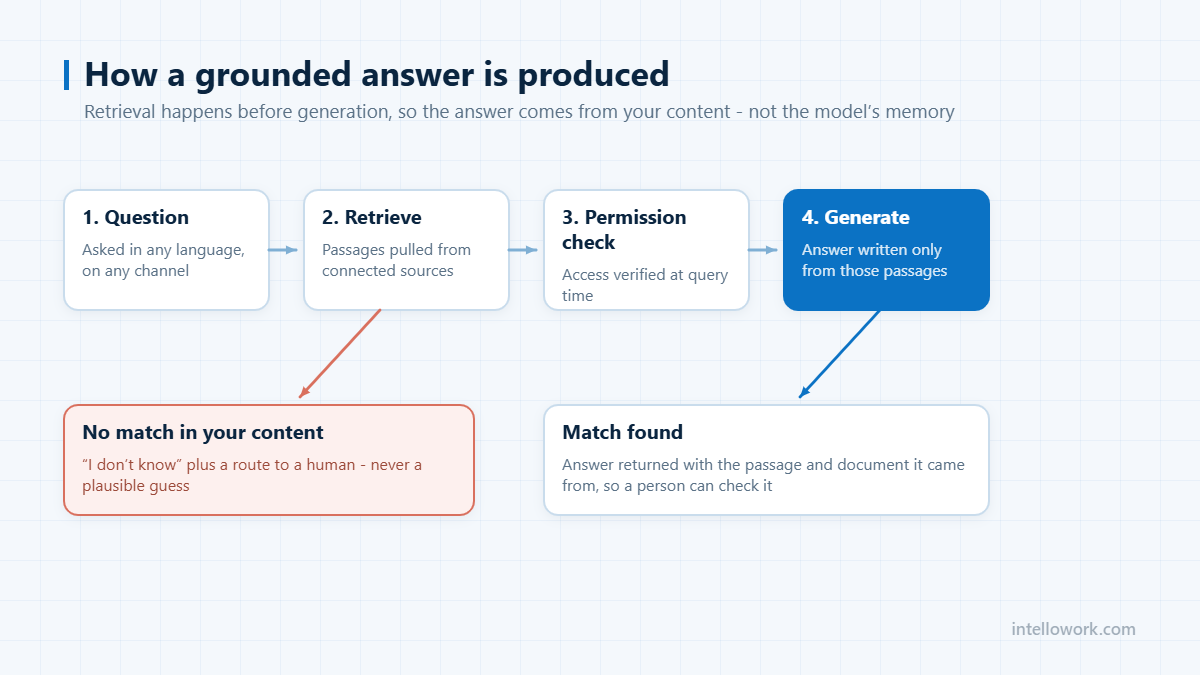
The fourth option is purpose-built for exactly this search intent: a platform that indexes your existing content — files, websites, Solr or search indexes, APIs — and answers questions using retrieval-augmented generation. The assistant retrieves the relevant passages from your indexed documents first, then generates its answer only from those passages, with a citation to the source.
This is what IntelloWork is. The differences that matter compared to the first three options:
Citations on every answer. Each response links to the exact document, section and paragraph it came from, so anyone can verify in one click — and stale documents get exposed the moment they cause a wrong answer.
Permissions inside retrieval. Document-level access control travels into the search index itself. An employee only gets answers from documents their role allows; a guest can’t extract internal content no matter how the question is phrased. This is the single biggest gap in options 1–3, and it’s the first thing a security review checks. We’ve covered why it matters in depth in our guide to AI chatbots for internal knowledge bases.
Your model, your keys. Bring your own LLM — OpenAI, Anthropic, AWS Bedrock, Azure — so “ChatGPT for our documents” can literally run on the provider your security team has already approved, with data residency you choose.
Every channel, one brain. The same grounded pipeline answers in a website widget, WhatsApp, Slack and Teams — so customers, frontline staff and desk employees all get identical, permission-filtered answers.
Always current. Connectors sync your sources continuously. Update the document once; every channel answers correctly from that moment. No re-uploading.
How to Choose
Use the simplest option that survives your real requirements. One person, one document, nothing confidential: paste it into ChatGPT. A small team with a stable folder of non-sensitive docs: a Custom GPT. All knowledge inside Microsoft 365 and budget for every seat: Copilot. Multiple content sources, confidential documents, customers or frontline staff to serve, or any need for citations and access control: a grounded platform is the only option on this list actually designed for the job.
For a full breakdown of what “enterprise-grade” means in this category, see our enterprise AI chatbot guide.
The four options, compared on what matters
Feature lists blur these together. The differences that decide the choice are governance ones.
| Upload per chat | Custom GPT | Enterprise suite | Grounded platform | |
|---|---|---|---|---|
| Respects your existing permissions | No | No | Within its own ecosystem | Yes, enforced per answer |
| Content stays current automatically | No, manual re-upload | No, manual refresh | Yes, inside the suite | Yes, across connected sources |
| Answers cite the source passage | Weak | Weak | Varies | Yes, passage-level |
| Covers content outside one vendor | Whatever you upload | Whatever you upload | No | Yes |
| Audit trail of who asked what | No | Limited | Yes | Yes |
| Realistic document volume | Tens | Hundreds | Whole tenant | Whole estate |
The row that ends most debates is the first one. Uploading a document to a chat interface removes it from your access model completely: the file is now answerable by anyone who has the conversation, regardless of who was allowed to read it in the source system.
A short decision checklist
Work down this list and stop at the first answer that is true.
- Is the content confidential or permission-controlled? If yes, options one and two are out, whatever the convenience.
- Does it change more than occasionally? If yes, anything requiring manual re-upload will be stale within weeks and trusted for longer than that.
- Does it live in more than one system? If yes, a suite-bound assistant answers only part of the question, which is worse than answering none of it.
- Do answers need to be defensible? If someone must be able to check the source, you need passage-level citations, not a plausible summary.
- Is any of it regulated? If yes, start from retention, residency and erasure, and let those eliminate options before features do.
Most teams arrive at a grounded retrieval platform for the sensitive core and keep the lightweight options for public or throwaway material. That split is fine, provided the boundary is written down. The architecture behind the grounded option is explained in retrieval-augmented generation (RAG), and the deployment question in private ChatGPT for enterprises.
Frequently Asked Questions
Can I use ChatGPT on my company’s documents directly?
Yes, by uploading files per conversation or building a Custom GPT — but file limits, manual re-uploads, missing access control and weak citations make both unsuitable beyond small, non-sensitive document sets.
Is it safe to upload confidential company documents to ChatGPT?
It depends on your plan and settings, but the bigger issue is governance: uploads bypass your access controls entirely, and anyone with the file can share it with an AI outside your audit trail. Confidential content belongs in a system that enforces permissions on every answer.
What is a RAG chatbot?
A retrieval-augmented generation chatbot retrieves relevant passages from your indexed documents first, then generates its answer only from those passages — which grounds responses in your actual content and enables per-answer citations.
Can employees ask questions about documents on WhatsApp?
On a multi-channel platform, yes. IntelloWork serves the same permission-filtered, cited answers on WhatsApp — including voice-note questions — as it does in Slack, Teams and web chat.
How long does it take to set up ChatGPT-style answers on our documents?
With a platform that connects to existing sources, days. Request IntelloWork access and you’ll have a workspace within a day — connect a source and ask your first questions the same afternoon.
Related: multilingual answers from your documents, in any language.
What happens to documents I upload to a chat tool?
They are stored by the provider under whatever retention its terms specify, and they become answerable to anyone with access to that conversation or assistant. The governance consequence matters more than the storage one: the file has left your access model, and no audit of your source system will show that it was read.
Can employees be stopped from uploading company documents?
Only partially by policy, which is why the practical answer is to provide a sanctioned alternative that is easier than the workaround. Teams that block public AI tools without offering a grounded internal option tend to move the behaviour onto personal devices, where there is no visibility at all.
How many documents can a grounded platform handle?
Retrieval platforms are built for the whole estate rather than a document set, so volume is rarely the limit. The limits that bite are content quality and permission complexity: contradictory versions of the same policy and an undocumented access model will cause more failures than corpus size ever will.
Where there is no approved route, employees paste documents into public tools instead. Our guide to shadow AI explains the cost, and the fix.