
AI Search for SharePoint: How Permission-Aware Answers Work
Updated 4 September 2026
AI search for SharePoint answers a question in one line, instead of handing back a list of files. First, it reads the sites, libraries and lists you already run. Then it writes the answer from the passages inside them. Above all, it respects the permissions you set years ago, so nobody ever sees a paragraph they could not open on their own.
This guide covers what changes, how the indexing works, what it costs and how to prove it in 30 days. If you are still mapping the category rather than choosing inside it, start with our guide to enterprise knowledge search.
Why SharePoint search still leaves people hunting
SharePoint is good at finding files. However, most people are not looking for a file at all. They want one rule, one number or one clause.
So the hunt begins. First they type a phrase they half remember. Then they scan forty results. After that they open five documents, and finally they scroll to the paragraph that matters. Meanwhile the same question also lands in a colleague’s inbox.
Three habits of keyword search cause this.
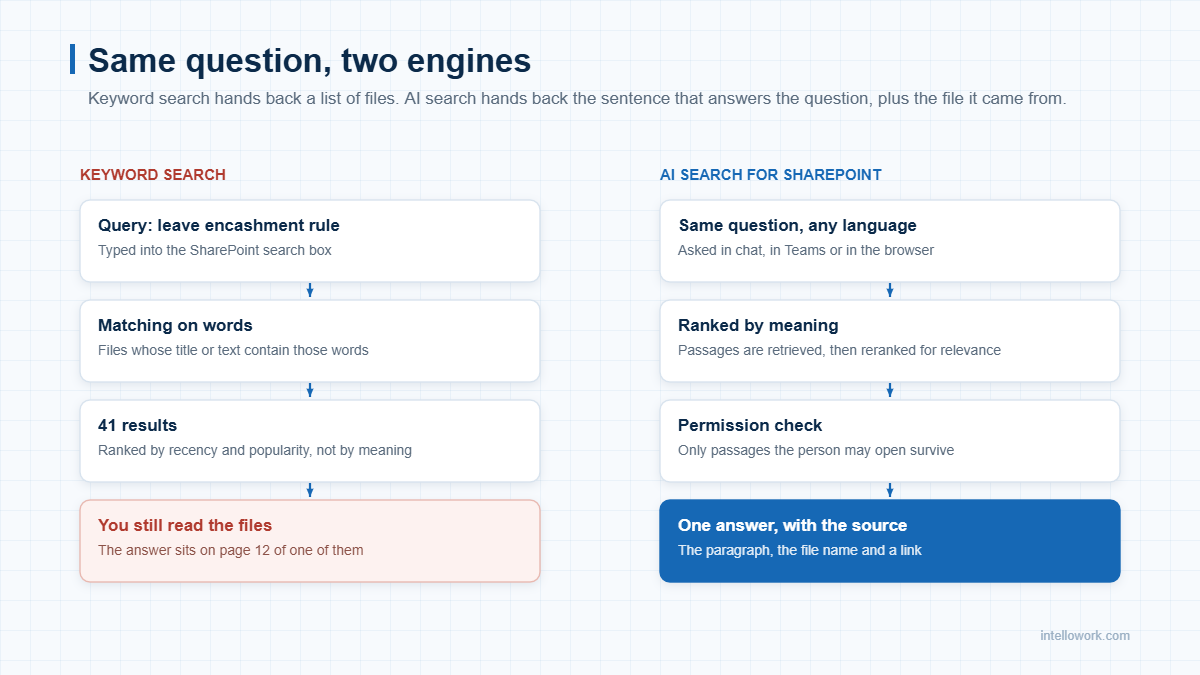
- It matches words, not meaning. For example, your policy says “encashment” while your team types “cash out”, so the right file sinks down the list.
- It returns files, not answers. A result set is only a starting point, because the reading still falls to a person.
- Your content is scattered. In fact, half the truth sits in SharePoint. The rest lives in Teams, in Confluence or on a shared drive.
What AI search for SharePoint changes
Certainly the shift looks small on the surface, although it is large underneath. People still type a question. Behind that box, though, the engine now ranks passages by meaning rather than by words.
As a result, three things change at once. The answer arrives as a sentence. Every claim carries the file it came from. And the person only ever sees content they already had rights to.
| Job to be done | Native SharePoint search | AI search for SharePoint |
|---|---|---|
| Find a policy rule | Lists files that mention the words | Quotes the rule, then links the file |
| Handle different wording | Struggles when phrasing differs | Matches on meaning, so synonyms work |
| Work across tools | Mostly stays inside Microsoft 365 | Reads SharePoint, Confluence, Drive and tickets together |
| Respect access rights | Trims results by permission | Trims passages, so the answer itself stays clean |
| Answer in Hindi or Tamil | Needs the document in that language | Answers in the asker’s language from English source files |
| Show its working | You open the file yourself | Citation sits under each claim |
How permission-aware AI search for SharePoint works
Nothing here is magic, because the order matters far more than the model. Below is the path a question actually travels.
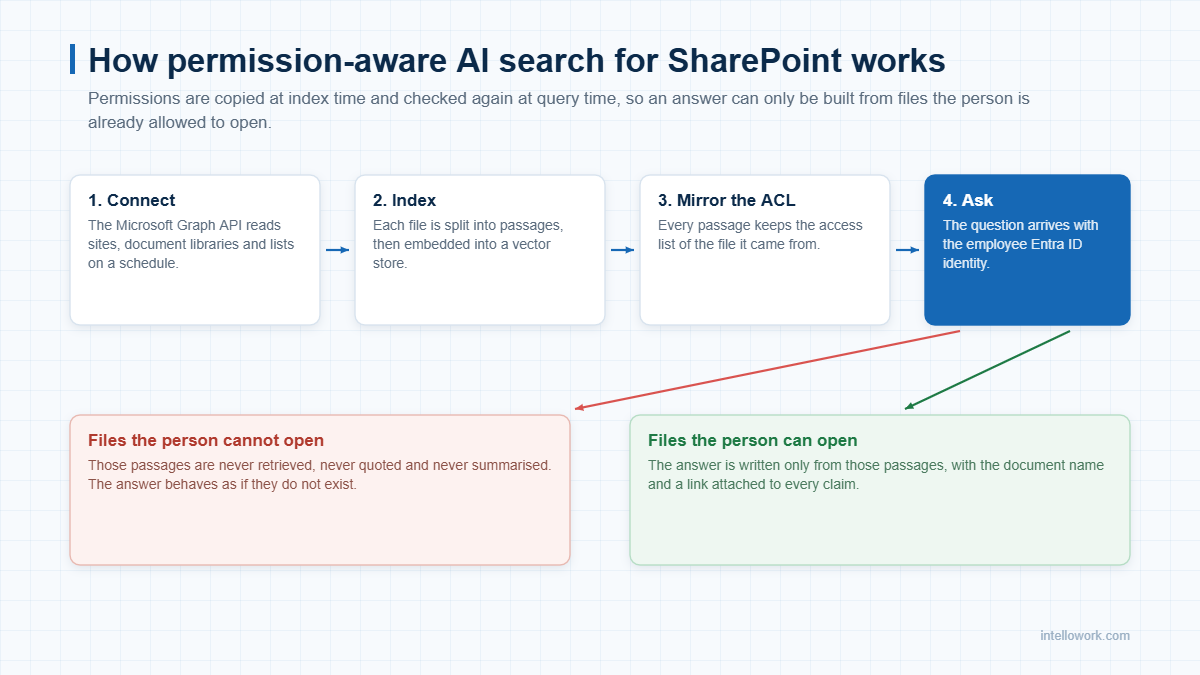
- Connect. The Microsoft Graph API reads your sites, libraries and lists on a schedule. Consequently, delta queries pick up only what changed since the last run.
- Split and embed. Next, each document breaks into passages of a few hundred words. Every passage then gets a vector, so meaning becomes searchable.
- Mirror the access list. Each passage carries the groups and users who may read its source file. Because that metadata travels with the passage, filtering stays exact.
- Check identity at query time. The question arrives with the person’s Entra ID identity. Then only passages that survive the filter reach the model.
- Write and cite. The model composes an answer from those passages alone. It then attaches the document name and a link.
Microsoft documents the same pattern for its own stack, and their write-up on document-level access control is worth reading before you buy anything. If you want the retrieval side in more depth, see our explainer on retrieval augmented generation.
Four ways AI search for SharePoint goes wrong
Most demos look identical. Therefore the useful questions sit slightly off the happy path.
- Stale permissions. Someone leaves a project group on Monday. Does the index know by Tuesday, or only after the next full crawl?
- Broken inheritance. SharePoint lets a single file break inheritance from its library. A weak connector copies the library rule and leaks that file.
- Silent gaps. If a connector skips a library, the assistant answers anyway. Ask how it reports coverage.
- Confident guessing. When nothing matches, the honest reply is “I do not know”, plus a route to a human. Our note on chatbot hallucination covers how to test for that.
What to connect to AI search for SharePoint first
To begin with, start narrow. A tight index of good content beats a wide index of noise, because ranking quality falls fast once duplicates arrive.
| Wave | Source | Why it goes here |
|---|---|---|
| Wave 1 | HR and finance policy libraries | Stable, owned and asked about daily |
| Wave 1 | IT knowledge base and runbooks | High volume, and clearly written already |
| Wave 2 | Team sites and project libraries | Useful, though permissions get complex |
| Wave 2 | Confluence or Drive spaces | Closes the gap between tools |
| Wave 3 | Ticket history and email archives | Rich, but it needs careful clean-up first |
For the wider connector picture, our guide to enterprise chatbot integrations maps the usual sequence.
Where teams feel the gain first
| Team | Question they repeat | What good looks like |
|---|---|---|
| IT helpdesk | How do I reset MFA on a new phone? | Level 1 volume drops within a month |
| HR | How much leave carries forward? | Fewer repeat emails during appraisal season |
| Sales | What did we promise on data residency? | Faster, safer answers inside a live deal |
| Finance | What is the approval limit for this spend? | Fewer exceptions, and cleaner audits |
| New joiners | Where is the deployment runbook? | Shorter ramp, and less senior time lost |
Security, residency and DPDP
Indian buyers raise the residency question early, and rightly so. AI search for SharePoint can run entirely inside the region you pick, so document text never leaves it.
- Region. Keep the index, the embeddings and the model calls in one region, for example Mumbai.
- Retention. Decide how long you hold query logs, then apply that rule automatically.
- Training. Get it in writing that your content never trains a shared model.
- Audit. Keep a record of who asked what, and of which documents the answer used.
- Redaction. Mask identifiers in logs, since a log is personal data too.
The DPDP Act ties duties to personal data rather than to a tool. Consequently the same rules follow your assistant wherever it runs. Our note on DPDP and AI assistants covers consent and notice in more detail.
One more point deserves attention. AI search for SharePoint should fail closed, not open. If the permission service is unreachable, the right behaviour is to return nothing at all.
What AI search for SharePoint costs to run
Costs split into three buckets, though only the first is a licence.
| Cost bucket | Typical range for 300 to 500 users | Notes |
|---|---|---|
| Platform licence | Rs 8 to 18 lakh a year | Usually per seat, with a floor |
| Model and infrastructure | Rs 2 to 5 lakh a year | Falls as caching improves |
| Setup and connectors | Rs 2 to 6 lakh, once | Depends on how tidy your libraries are |
| Internal owner | Roughly 0.2 of a role | Someone must keep content current |
Of course, those ranges assume a cloud deployment in your own region. Our enterprise chatbot pricing breakdown goes further into the variables.
A 30-day AI search for SharePoint pilot
Above all, a pilot should settle an argument rather than fill a slide. So keep it small and measurable.
- Week 1. Pick two libraries and one team. Collect fifty real questions from tickets and chat threads.
- Week 2. Index those libraries, then answer all fifty questions. Score each answer as correct, partly correct or wrong.
- Week 3. Fix the content that caused wrong answers. Usually the fault sits in the document, not the model.
- Week 4. Open it to the team. Track usage, unanswered questions and time saved per lookup.
Our checklist for an AI chatbot pilot has the full scoring sheet.
Frequently asked questions
Can AI search for SharePoint see files I cannot open?
No. Each passage carries the access list of its source file, and the engine checks your identity at query time. Therefore a file you cannot open never reaches the answer, and it never appears in a summary either.
Do we have to move content out of SharePoint?
No. Instead, the index sits beside SharePoint and points back to it. Your files stay where they are, and your existing governance still applies.
How long does the first index take?
Usually a few hundred thousand documents finish inside a day. After that, delta crawls keep the index current, so changes show up in minutes rather than weeks.
What happens when the assistant does not know?
Then it should say so. A grounded system replies that it found nothing, then routes the person to the right team. Guessing is worse than silence.
Can it answer in Hindi or another language?
Yes, and across languages. For example, someone can ask in Hindi and still get the answer from an English policy file, because retrieval happens in a shared multilingual space.
How is this different from Microsoft Copilot?
Copilot works beautifully inside Microsoft 365. However, much of your knowledge also sits in Confluence, Drive, tickets and internal APIs. AI search for SharePoint from a separate layer covers those sources too, and it runs in the region you choose.
Talk to us
In short, IntelloWork runs AI search for SharePoint alongside Confluence, Drive, tickets and internal APIs, with permissions enforced on every answer. See how it works at intellowork.com, or ask us for a pilot on two of your own libraries.