AI Chatbot for Confluence: Turn Your Wiki Into Answers Your Team Trusts
Updated 4 September 2026
An AI chatbot for Confluence is not a search upgrade. It is a different contract with your team: ask in plain language, get one answer, see the exact page it came from, and get back to work. Confluence search hands you seventeen results and a date filter. That gap is the reason the same six questions land in your ops lead’s DMs every single week.
This guide covers what actually changes when you deploy an AI chatbot for Confluence, the permission trap that sinks most rollouts, how to connect Confluence properly, and what to measure before anyone signs a renewal.
Why Confluence search fails at exactly the wrong moment
Confluence is very good at storing knowledge. It was never designed to answer a question. Four failure modes show up in almost every workspace we see:
- Vocabulary mismatch. The page says “Time Away Policy”. The employee types “how many PTO days do I get”. Keyword search finds nothing useful, so they ask a human.
- Duplicate truth. Three pages answer the same question. Two are stale. Search ranks them by keyword weight, not by which one is still correct.
- Space sprawl. Content lives in the space of the team that wrote it, not the team that needs it. Finance policy sits in a Finance space that most employees never open.
- No synthesis. The answer is spread across a policy page, a linked table, and a comment thread. Search returns all three and leaves the assembly work to a human.
None of this is a Confluence defect. It is the difference between retrieval and answering — the same gap that creates knowledge silos across every internal tool, and the reason enterprise knowledge search has moved from links to answers.
What an AI chatbot for Confluence actually does differently
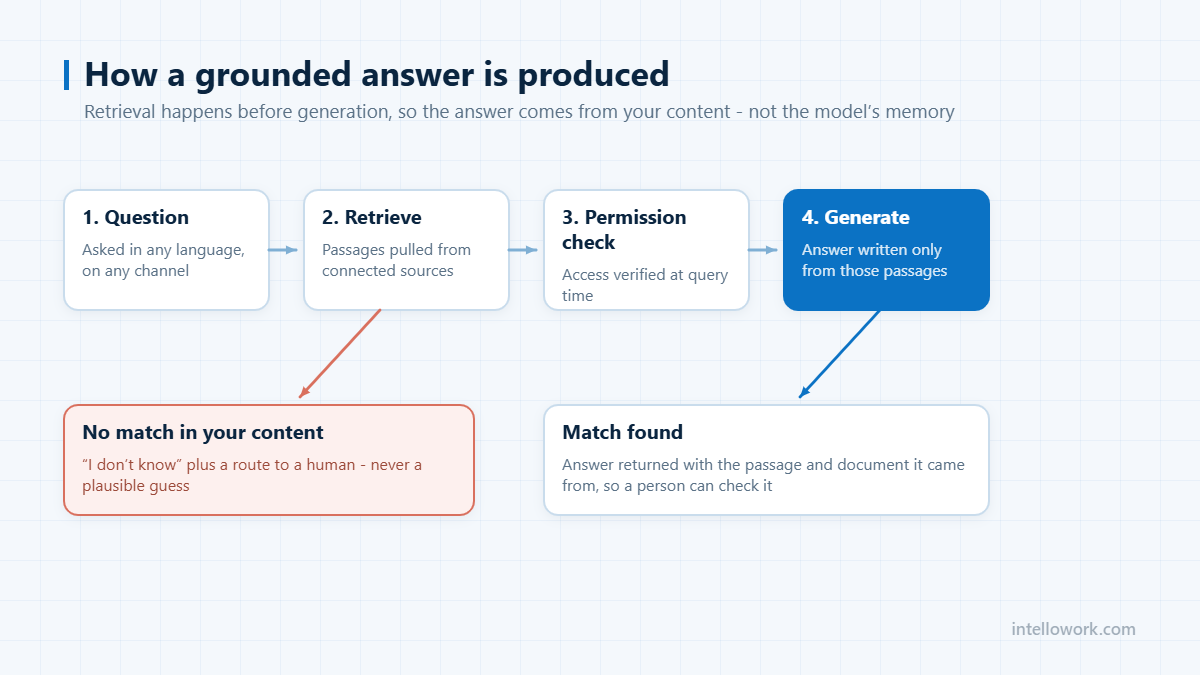
A grounded assistant does four things a search box cannot:
- Reads the intent, not the keywords. “Can I expense a client dinner in Mumbai” resolves to the travel and entertainment policy even though none of those words appear in the title.
- Returns one answer with a citation. The response names the source page and links to it, so the reader can verify in one click instead of trusting a paragraph of confident prose.
- Refuses when it should. Below a confidence threshold, the correct output is “I could not find this in your spaces” plus a handoff — not an invented policy. This is the single biggest trust factor in internal deployments.
- Holds context across turns. “And if the client is international?” continues the same thread instead of starting a new search.
The mechanism behind this is retrieval-augmented generation: the model never answers from training data, it answers from passages pulled out of your wiki at query time. If that architecture is new to you, start with our primer on what retrieval-augmented generation is and why it matters for enterprises.
The permission problem nobody talks about
This is where most Confluence chatbot projects quietly fail, and it is worth being blunt about it.
Confluence has real access control: space permissions, page restrictions, and inherited restrictions on child pages. A naive ingestion job flattens all of that. Every page goes into one index, and suddenly your assistant will happily summarise the compensation band page to an intern because the retrieval layer has no idea who is asking.
The fix is permission-aware retrieval, and it has three requirements:
- Identity has to arrive with the question. The assistant needs to know who is asking, via SSO — Okta, Azure AD, Google, Keycloak or generic OIDC — not via a shared service account.
- ACLs have to be filtered at retrieval time, not at display time. If a restricted passage reaches the model, it can leak into the answer even when the citation is hidden. The candidate set itself must be filtered before generation.
- Permissions have to re-sync. Someone changes teams on Monday; the index needs to know by Tuesday, not at the next full re-crawl.
Ask any vendor to demonstrate this with two accounts side by side, on the same restricted page, in the same demo. Most cannot. More on the identity plumbing in our guide to enterprise chatbot integrations: SSO, SAP, Salesforce and internal APIs.
How to set up an AI chatbot for Confluence in four steps
The connection itself is the easy part. Doing it in an order that produces a trustworthy assistant is the part people skip.
- Inventory before you ingest. List your spaces and mark each one: authoritative, reference, or archive. Do not index archived spaces, personal spaces, or draft-heavy project spaces on day one. Half the hallucination complaints in internal rollouts trace back to indexing content nobody considers current.
- Ingest through the API or a scoped crawl. Confluence exposes its content over REST, which lets you pull page bodies, labels, space keys, restriction metadata and last-modified timestamps in one pass. A crawl of a public space works too, but you lose the restriction metadata — which matters for the section above.
- Map restrictions to identities. Space keys and page restrictions become retrieval filters, tied to the groups your SSO provider already emits.
- Set freshness and confidence rules. Two dials do most of the work: a recency weight so a page updated last month outranks a duplicate from 2023, and a confidence threshold below which the assistant escalates instead of guessing.
IntelloWork handles this through its content plane — JSON APIs, site crawls and file uploads with auto-detected schemas and ACL mapping — so a Confluence space becomes a permission-aware source without a custom pipeline. You can see the shape of it on the architecture overview.
Put the answer where the question already gets asked
Nobody opens a new tab to ask a chatbot. This is the second most common reason internal assistants get low adoption, and it has nothing to do with answer quality.
Your employees ask in Slack or Teams, because that is where they already are. An AI chatbot for Confluence should therefore be reachable as a bot in those channels, as a widget on the wiki itself, and over an API for anything internal you have built. One retrieval pipeline, several surfaces — not three separate bots that drift apart. We covered the trade-offs of each surface in choosing the right AI chatbot channels and in the broader guide to an internal AI chatbot for employees.
What to measure in the first 30 days
Four numbers tell you whether an AI chatbot for Confluence is working. Everything else is decoration.
| Metric | What good looks like | Why it matters |
|---|---|---|
| Cited answer rate | Above 80% of answered questions carry a source link | Answers without citations are unverifiable, and unverifiable answers destroy trust fast |
| Escalation rate | Falling week over week | The honest measure of whether the wiki actually contains the answers |
| Unanswered question log | Reviewed weekly by a content owner | This is the highest-value output of the whole project: a ranked list of documentation you are missing |
| Stale source hits | Trending to zero | Every citation pointing at an out-of-date page is a page someone needs to own or archive |
That fourth metric is the one teams underrate. A Confluence assistant is also a documentation audit that runs itself. For the wider instrumentation question, see what to track when monitoring internal AI assistants.
What an AI chatbot for Confluence cannot fix
Three honest limits, because the vendors who skip this section cost you a quarter:
- Wrong pages produce wrong answers. Grounding guarantees the answer matches your wiki. It does not guarantee your wiki is right. Citations at least make the error traceable to a page you can fix.
- Decisions made in DMs are invisible. If the real policy lives in a thread rather than a page, no retrieval system will find it. The unanswered question log is how you catch this.
- Unowned content decays. An assistant slows the decay by surfacing stale pages, but somebody still has to own them.
Frequently asked questions
Does an AI chatbot for Confluence replace Confluence search?
No, and it should not try to. Search is still better for browsing and for finding a page you already know exists. The assistant handles the “what is the answer” questions, which is where search performs worst.
Will it expose restricted pages?
Only if it was built badly. With permission-aware retrieval, restricted passages never enter the candidate set for a user who lacks access, so they cannot appear in an answer or a citation. Insist on a live two-account demonstration before you buy.
How long does setup take?
Connecting a handful of spaces and getting cited answers is a days-not-months exercise. Getting to high answer rates takes a few weeks, and most of that work is content cleanup rather than configuration.
What about Confluence content in multiple languages?
Retrieval and answering can be language-independent: an employee asks in Hindi, the passage is in English, the answer comes back in Hindi with the English source cited. See our note on multilingual AI chatbots.
Should we pilot this or roll it out?
Pilot, with written exit criteria agreed before day one. We laid out a four-week structure in how to run an AI chatbot pilot that proves something.
Next step
If your wiki is large enough that people have stopped searching it, that is the signal to try an AI chatbot for Confluence. Point an assistant at two or three authoritative spaces, wire in SSO, and watch the unanswered question log for a fortnight — you will learn more about your documentation in ten working days than in a year of surveys. Request IntelloWork access and you will be in a workspace within a day.
Most teams run Confluence alongside Microsoft 365, so our guide to AI search for SharePoint covers the other half of that index.