
Enterprise Chatbot Integrations: SSO, SAP, Salesforce, and Your Internal APIs
Updated 1 September 2026
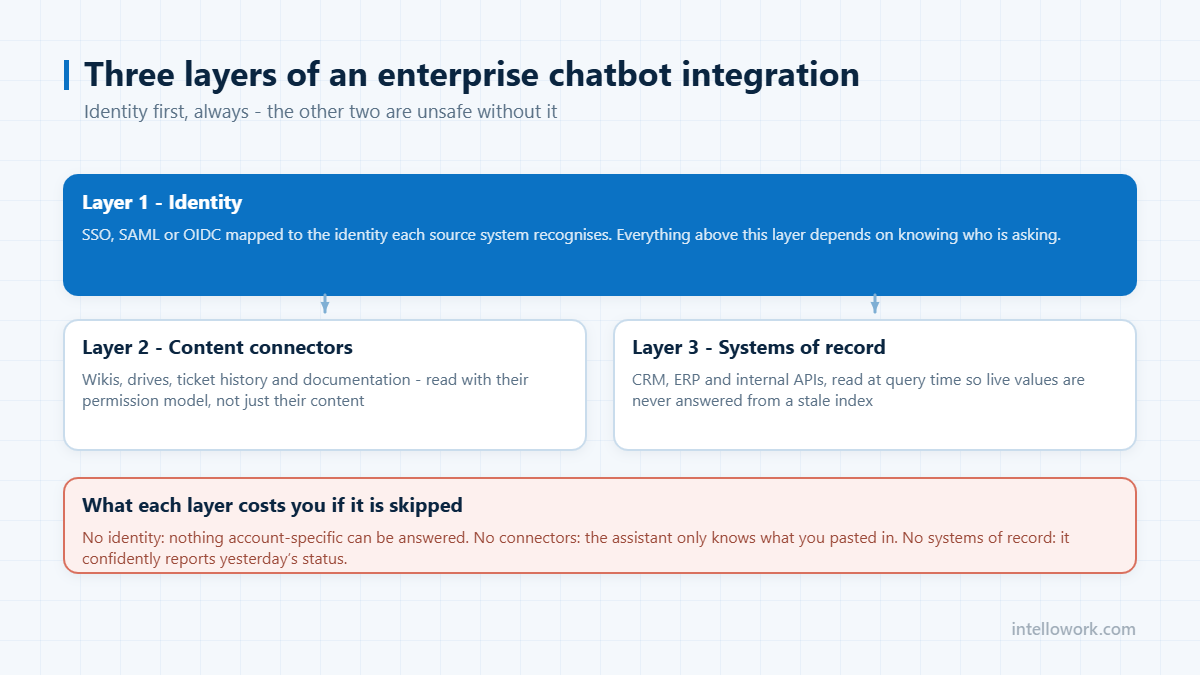
Enterprise chatbot integrations are what separate an assistant that answers questions from one that gets work done. Three layers matter, in this order: identity, so the assistant knows who is asking and what they may see; content, so it can retrieve the answer; and systems of record, so it can look things up and eventually act. Get the order wrong and you build something that either leaks data or cannot answer anything specific.
Layer 1: identity, first and always
SSO is not a login convenience here. It is the mechanism that carries identity into the retrieval query. Without it, every answer is generic, and any content in the index is effectively public to anyone who can reach the chat box.
What good looks like: SAML or OIDC against your identity provider; group and role claims passed through with every query, not just at session start; the permission filter applied at retrieval time so restricted passages never enter the model context; and a re-sync path so that removing someone from a group takes effect in minutes, not at the next full reindex. Ask vendors when a revoked permission takes effect – the answer is revealing.
Layer 2: content connectors
| Source | What it contributes | The hard part |
|---|---|---|
| Confluence, Notion, SharePoint | Policy, process, project documentation | Space and page-level ACLs, and stale pages |
| Google Drive, OneDrive | The documents nobody moved to the wiki | Per-file sharing rules, duplicates |
| Jira, ServiceNow, Zendesk | Resolved tickets – the real answers | Volume, and separating fix from chatter |
| Slack, Teams | Decisions never written down elsewhere | Channel privacy, signal-to-noise |
| Salesforce, HubSpot | Account, contract and entitlement context | Record-level visibility rules |
| SAP and ERP | Master data, orders, inventory | Authorisation objects and API latency |
The test of a connector is not whether it can read the content. It is whether it reads the source system’s permissions along with the content, and keeps them in sync. A connector that ingests a SharePoint site as one flat blob has thrown away the permission model you spent years maintaining. Confluence specifics are covered in AI chatbot for Confluence.
Layer 3: systems of record
Documents answer “what is the policy”. Systems of record answer “what is true for me right now” – my leave balance, this order’s status, that customer’s entitlement. These are live API calls, never cached, always executed as the asking user rather than as a service account with broad rights.
Sequence matters. Read-only lookups first, for months. Write actions – raising a ticket, applying leave, updating a record – only after the read path is trusted, and always behind an explicit confirmation that shows exactly what will happen. An assistant with ambient write authority is a prompt-injection target, as set out in our security and compliance checklist.
A sequencing plan that works
- SSO. Nothing else starts until identity flows with the query.
- One content source, done properly. Usually the wiki. Permissions intact, incremental sync working.
- Ticket history. The highest-value second source, and the least obvious.
- One read-only system lookup. Proves the live-data path end to end.
- Remaining content sources. Each one now cheap because the pattern is established.
- Write actions, one at a time, with confirmation.
Organisations that connect eight systems in month one spend month two debugging permissions across all eight simultaneously. See the integration guide for the fuller version.
Latency, caching and the user experience
Integrations that call live systems introduce latency the user feels. A document-only answer returns in a second or two; an answer that waits on an ERP authorisation check and a CRM lookup can take considerably longer, and users abandon well before a technical timeout fires.
Three practical mitigations. Stream the document-grounded part of the answer immediately and append the live figure when it arrives, rather than holding the whole response. Cache reference data that changes slowly – holiday calendars, product catalogues, org structure – and never cache anything person-specific such as balances or entitlements. And set a visible timeout: if the system of record has not responded in a few seconds, say so and offer to raise a ticket rather than spinning.
What to ask a vendor about each connector
- Does it read the source system’s ACLs, or only its content?
- Is sync incremental, and what is the lag between a document changing and the index reflecting it?
- What happens to the index entry when the source document is deleted?
- Which authentication model does it use – delegated user access, or a service account with broad rights?
- Is this connector included in the tier I have been quoted, or one above it?
- What is the behaviour when the source system is unavailable?
The third question is the one most often answered badly. If deleting a document from SharePoint leaves its text answerable in the assistant, you have a retention and erasure problem that will surface in your next audit, not a minor sync bug.
Frequently asked questions
What should we integrate first?
SSO, before any content source. Identity has to travel with the retrieval query or every answer is generic and every indexed document is effectively public. After that, one content source done properly with permissions intact, then resolved ticket history.
How do chatbot integrations preserve permissions?
The connector must read each source system’s ACLs alongside the content and store them as index metadata, and the assistant must apply that filter at retrieval time so restricted passages never reach the model. Filtering after generation is not equivalent and will not satisfy an auditor.
Should the chatbot be able to write to our systems?
Eventually, and carefully. Run read-only for months first. When you add write actions, add them one at a time, execute them as the asking user rather than a broad service account, and require an explicit confirmation showing exactly what will happen before it happens.
Why index resolved tickets?
Because they contain the working answer expressed in the words people actually use, rather than the words the policy uses. Ticket history typically lifts answerable coverage more than any prompt or model change, and it also reveals which questions your formal documentation never covered.
Next step
List every system you will need connected by year two, then ask vendors which of those connectors read source permissions and how fast a revoked permission propagates. IntelloWork is built on that model, and it is the right question to put to anyone.