
Top Enterprise Knowledge Search Tools in 2026: Categories First, Then Names
Updated 4 September 2026
Search for enterprise knowledge search tools and you get a list of names with no shared definition behind it. Classic enterprise search engines, modern answer platforms, wiki-native search add-ons and general-purpose AI suites all appear together, and they solve overlapping but genuinely different problems. Sorting by category first makes the shortlist obvious; sorting by feature grid does not.
Four categories
Classic enterprise search. Index-and-rank engines with mature connectors, built before the answer layer existed. Strong at scale, federation and fine-grained security trimming. Weaker at synthesis: you get ranked documents, and the user still reads. Elasticsearch-based platforms and long-standing enterprise search products sit here.
Knowledge-grounded answer platforms. Retrieval plus generation, with permissions treated as an architectural concern rather than a setting. The user gets an answer with citations rather than ten results. Glean, Dashworks, Guru and IntelloWork are examples. This is the category most organisations actually mean when they search the phrase.
Wiki-native search. Search built into the tool where the content already lives – Confluence, Notion, SharePoint. Cheap, immediate, permission-correct within that system, and blind to everything outside it. Fine if your knowledge really does live in one place, which it almost never does.
General AI suites. Assistant features bundled into a productivity platform you already own. The commercial logic is strong and the coverage follows the vendor’s own ecosystem, which is excellent inside it and thin outside it.
Which category fits which problem
| If your problem is | Look at | Because |
|---|---|---|
| Content in one system, findability poor | Wiki-native search | Cheapest fix, permissions already correct |
| Content across five or more systems | Answer platform | Connector breadth is the whole problem |
| Very large corpus, strict security trimming | Classic enterprise search, or a hybrid | Scale and federation are mature there |
| Everything is already in one vendor ecosystem | General AI suite | Coverage and commercials both align |
| Users ask questions, not keyword queries | Answer platform | Ranked documents do not answer questions |
| Multilingual workforce, single-language docs | Answer platform with cross-lingual retrieval | Few other categories handle this at all |
What separates tools inside a category
Once the category is settled, four things distinguish the products, and none of them is the model.
Connector fidelity. Not the count on the website – the depth. Does the connector read the source system’s ACLs, sync incrementally, and handle deletions? A connector that ingests a SharePoint site as one flat blob has discarded the permission model you spent years maintaining.
Retrieval engineering. Hybrid keyword and vector search, cross-encoder reranking, structure-aware chunking, metadata filters for version and region. Pure vector similarity fails badly on error codes, policy numbers and product names, which is exactly what enterprise users search for.
Refusal and citation. Whether it declines cleanly when the corpus does not contain the answer, and whether citations attach to specific claims with deep links and document dates rather than three links at the bottom.
Operability. Can your own team measure quality after the vendor leaves? Golden sets, groundedness scoring, a content gap list. Without these you cannot tell whether the tool is degrading, and it will degrade as content ages.
The tools teams actually shortlist
Category first, names second. The table below places the products that come up most often in enterprise shortlists into the four categories above. Treat it as a starting map rather than a ranking: the right answer depends on where your content lives, how strict your access model is, and whether you need ranked documents or written answers.
| Tool | Category | Usually shortlisted when |
|---|---|---|
| Glean | Answer platform | Content is spread across many SaaS systems and you want answers, not links |
| Coveo | Classic search with an answer layer | Customer-facing search and commerce relevance matter as much as internal search |
| Elastic | Classic enterprise search | You have engineering capacity and want to own the index and the ranking |
| Lucidworks | Classic enterprise search | Large corpora, heavy relevance tuning, mixed internal and customer use |
| Sinequa | Classic enterprise search | Regulated industries with deep connector and security-trimming requirements |
| Atlassian Rovo | Wiki-native | The knowledge already lives in Confluence and Jira |
| Guru | Wiki-native | You want verified, owned cards rather than a raw document index |
| Microsoft 365 Copilot | General AI suite | SharePoint, Teams and Outlook are the system of record |
| Gemini for Google Workspace | General AI suite | Drive, Gmail and Docs are the system of record |
| Algolia | Search infrastructure | You are building search into your own product, not searching your intranet |
| IntelloWork | Answer platform | Multi-source retrieval with permission-aware answers, citations and multilingual access |
Two things are worth saying plainly about a table like this. First, vendors move between categories: almost every classic search engine has bolted on an answer layer, and almost every answer platform has had to get better at scale and permissions. Second, the marketing pages converge long before the products do. The differences that survive a pilot are connector depth, how permissions are enforced at query time, and what the system does when it does not know.
How to run a two-week evaluation
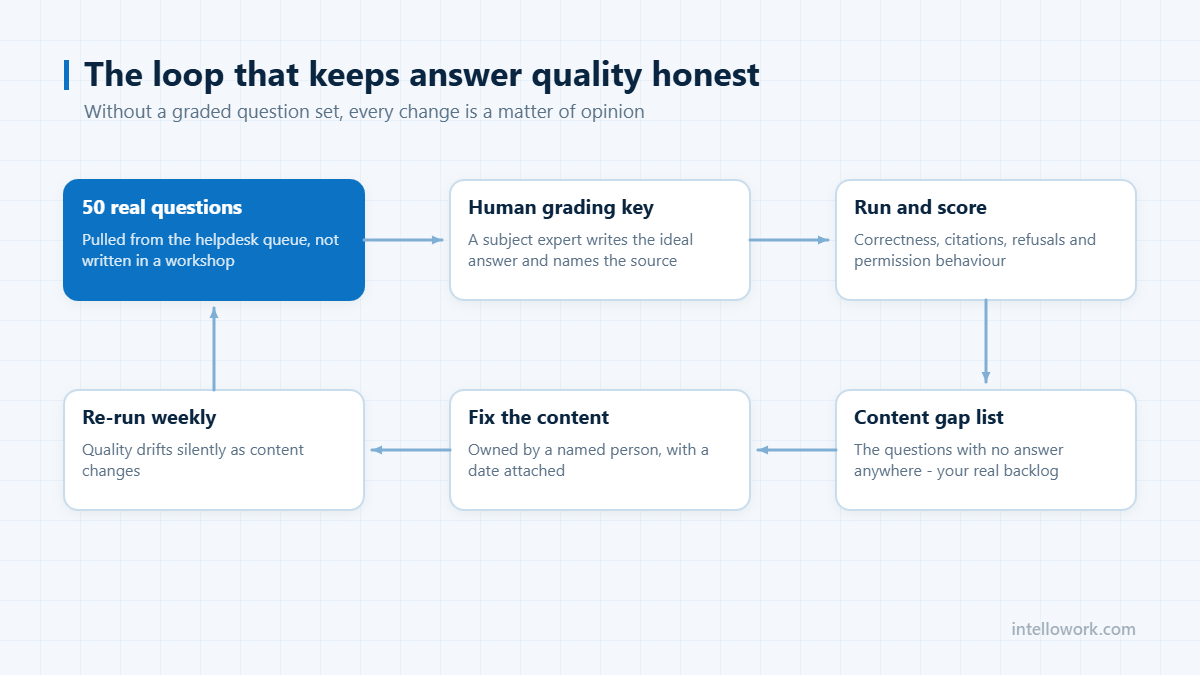
Feature grids do not separate these tools. A small, honest test does. Two weeks is enough if you fix the question set before you see any vendor demo.
- Write 50 real questions. Pull them from your helpdesk queue, not from a workshop. Include ten that have no good answer in your content, and five that only certain roles should be able to answer.
- Have a human write the ideal answer for each, with the source document. This is your grading key, and building it usually exposes content gaps before any tool does.
- Connect the same three sources in every product you test. Different connector sets make the comparison meaningless.
- Score four things: answer correctness, citation accuracy (does the linked source actually say it), refusal behaviour on the ten unanswerable questions, and permission behaviour on the five restricted ones.
- Re-run the set after a week of real usage. Tools that look identical on day one often separate once the index is warm and the content has churned.
The refusal test is the one most teams skip and the one that predicts adoption best. A tool that answers all fifty questions confidently, including the ten with no source, will be abandoned within a quarter. We go deeper on this in the guide to stopping AI chatbot hallucinations.
Permissions are the real dividing line
Every product in this market says it respects permissions. The meaningful question is when. Some systems filter at index time, building a separate view per group; some filter at query time against the source system; some filter after retrieval, which is the pattern that leaks. Ask the vendor to describe the mechanism, then test it: put a document in a restricted space, ask a user outside that group a question only that document answers, and see whether the answer, the citation, or even the document title comes back.
Ask about revocation too. When someone leaves a group on Monday, how long until the assistant stops answering from that content? Systems that copy content into their own index need an explicit reconciliation story, and the honest answer is usually measured in hours rather than seconds. If you operate under India’s data protection regime, the retention and erasure side of this matters as much as access – see the notes on DPDP Act consent rules for AI chatbots.
What these tools cost
Pricing in this category is quoted, not published, and it moves. The shapes are stable even when the numbers are not:
- Per seat, per month is the dominant model for answer platforms and wiki-native tools. It is predictable and it punishes broad rollouts, which is why pilots often stay small for the wrong reason.
- Platform plus consumption is common for classic enterprise search: a licence for the platform, then costs that scale with index size, queries, or compute.
- Bundled into an existing suite for the general AI assistants, where the marginal cost looks small but the coverage stops at the vendor’s own ecosystem.
- Implementation is the line item teams underestimate. Connector configuration, permission mapping and content clean-up are usually a larger first-year cost than the licence itself.
Budget for the content work explicitly. In most deployments the limiting factor is not the model, it is that the answer does not exist anywhere in a form the system can retrieve. A fuller breakdown of the commercial side sits in the enterprise chatbot pricing guide.
Frequently asked questions
What are enterprise knowledge search tools?
Tools that make an organisation’s internal content findable and answerable across the systems where it lives. They fall into four categories: classic enterprise search engines, knowledge-grounded answer platforms, wiki-native search, and assistant features bundled into general productivity suites.
What is the difference between enterprise search and an answer platform?
Enterprise search returns ranked documents and leaves the reading to the user. An answer platform retrieves relevant passages and generates a direct answer with citations, applying permissions at retrieval time. The first optimises for finding; the second for answering.
Do we need a separate tool if we already have Microsoft 365 or Google Workspace?
Only if significant knowledge lives outside that ecosystem. Bundled assistants cover their own vendor’s content well and third-party systems thinly. Count how many of your top twenty answer sources sit outside the suite before deciding.
Which enterprise knowledge search tool is best?
There is no single best tool, because the four categories solve different problems. If your content sits in one wiki, a wiki-native tool such as Atlassian Rovo or Guru is the cheapest correct answer. If it is scattered across five or more systems, an answer platform such as Glean or IntelloWork is the category to shortlist. If you have a very large corpus and strict security trimming, a classic engine such as Elastic, Lucidworks or Sinequa is the safer base. If everything already lives in Microsoft 365 or Google Workspace, start with the assistant you are already paying for.
How do enterprise search tools handle permissions?
Three ways, and the difference matters. Index-time filtering builds separate views per group. Query-time filtering checks the source system’s access control list on every request. Post-retrieval filtering removes results after the model has already seen them, which is the pattern most likely to leak content through summaries. Ask which mechanism a vendor uses, and test it with a restricted document before you sign.
How long does an enterprise search deployment take?
Connecting the first two or three sources is usually days. Getting answers people trust takes longer, and the time goes into permission mapping and content clean-up rather than configuration. A realistic first milestone is a scoped pilot on one department’s content within four to six weeks, then expansion once the answer quality holds.
Do enterprise search tools work across languages?
Some do, and the distinction is worth checking. Translating the query is not the same as retrieving across languages: a question asked in Hindi should still find the answer in an English policy document. Platforms built on multilingual embeddings retrieve across the language boundary; platforms that translate the query first often miss it entirely.
Next step
Settle the category, then apply the evaluation method in how to choose enterprise search tools. If your content spans several systems and your users ask questions rather than keywords, IntelloWork is in the right category to test.
Whichever tool you shortlist, check it against our guide to AI search for SharePoint, which sets out the permission questions that separate them.