Enterprise Search Chatbot: Turn Search Into Answers (2026)
Updated 4 September 2026
An enterprise search chatbot combines two technologies: enterprise search, which indexes content across your company’s systems and finds the relevant documents, and a conversational AI layer, which reads what search found and replies with the answer itself — cited to the source, filtered by the asker’s permissions, in plain language. The experience changes from “here are twelve documents that mention your query” to “here is the answer, and here’s exactly where it comes from.”
That shift sounds small. In practice it’s the difference between a search portal employees avoid and an assistant they use forty times a day. I’ve spent years building search systems, first for clients and then for IntelloWork, our own enterprise search chatbot — and I’ve watched the same story repeat: a company invests seriously in enterprise search, adoption stays disappointing, and everyone quietly goes back to asking the colleague who knows where things are. The chatbot layer is what finally closes that gap, and this guide covers everything I’ve learned about doing it properly: the architecture underneath, the security requirements that separate enterprise-grade from demo-grade, why your existing search infrastructure is the foundation rather than the casualty, what a realistic rollout looks like week by week, and how to measure whether the thing is actually working.
Why Enterprise Search Alone Stopped Being Enough
Classic enterprise search solves a genuinely hard problem: connecting silos — intranets, wikis, file shares, ticketing systems, CRM records, product docs — into one index, with each document’s access permissions intact. Companies running Solr, Elasticsearch or OpenSearch have often spent years on connector work, field mappings, synonym lists and relevance tuning. That work is valuable and none of it is wasted.
But look at what the user receives: a result list. The employee types “leave carry-forward policy,” gets nine documents that mention leave, opens three of them, scans for the paragraph, and mentally assembles the answer — hoping the 2023 version of the policy wasn’t the one that ranked first. The search engine did its job. The user still did most of the work.
Multiply that by every question, every employee, every day, and you get the paradox every knowledge manager recognizes: “search is available” coexisting with “nobody can find anything.” Adoption surveys blame the search engine; the real culprit is the interaction model. People don’t want documents. They want answers.
That’s the gap the chatbot layer closes — and it’s also why the timing matters. Large language models made it possible to generate a fluent answer from retrieved passages; retrieval-augmented generation made it possible to do so without the model inventing things. Together they turn the index you already have into an assistant people actually use.
How the Architecture Actually Works
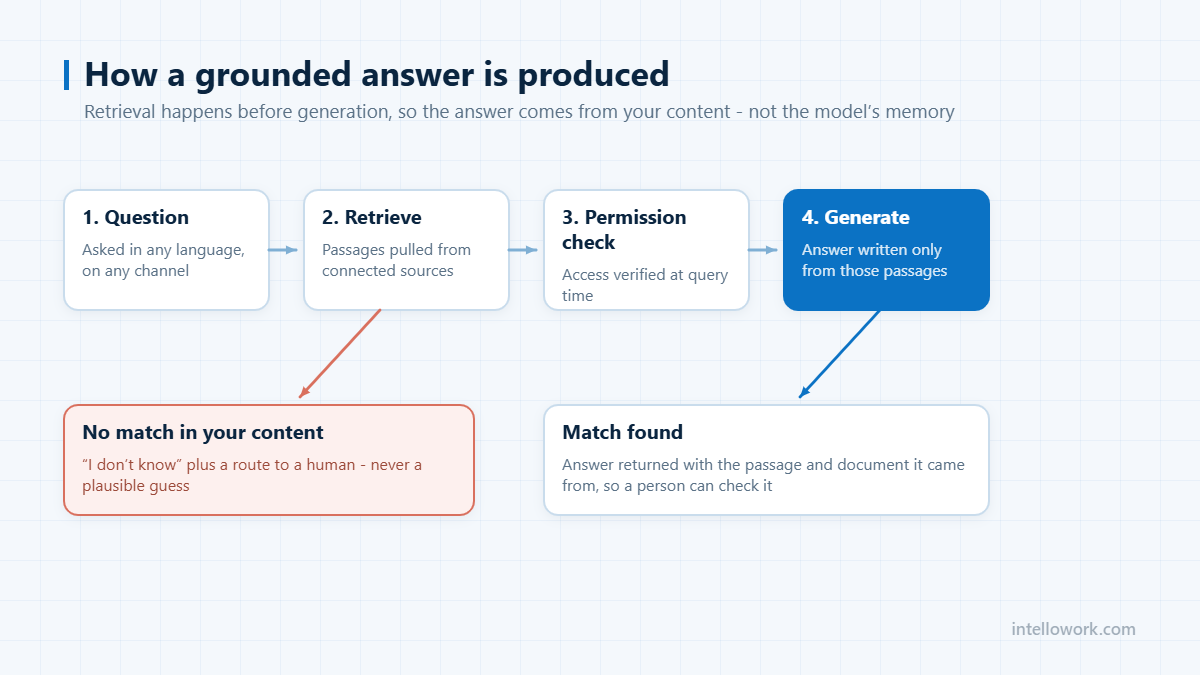
An enterprise search chatbot is a pipeline with three stages, and understanding them matters because when an answer goes wrong — and occasionally one will — the fix lives in a specific stage.
Stage one: ingestion. Connectors bring content into the index and keep it synchronized. This covers websites, file repositories, internal APIs — and, critically for teams with existing infrastructure, direct connections to Solr, Elasticsearch or OpenSearch indexes you already run. Ingestion handles chunking (splitting documents into passages along their logical structure, so a policy’s condition never gets severed from its exception), embedding generation for semantic search, and field mapping. The field that matters most is the one most platforms ignore: the access-control field. If your source system knows that a document is HR-only, that knowledge must travel into the index, or everything downstream is built on sand.
Stage two: retrieval. When a question arrives, the system runs hybrid search — vector similarity to capture meaning (“how do I get my money back” should match the refunds policy) combined with keyword matching to capture precision (product codes, error strings, plan names that vector search happily blurs together). The combined results are reranked, and the reranker produces a confidence score. That score is not decoration; it’s the safety mechanism. High confidence proceeds to generation. Low confidence produces an honest “I don’t have a reliable answer for that” with a hand-off option — because a bot that always answers is a bot that sometimes lies.
Stage three: generation, under constraint. The top-ranked passages go to a language model — GPT, Claude, a Bedrock-hosted model, whichever your organization has approved — with strict instructions to answer only from the provided passages, and to attach the citation for every claim. The model’s world knowledge stays out of the answer. The result reads like a colleague replying in chat, but every sentence traces back to a passage in your index.
The quality of the whole system is decided overwhelmingly at stage two. A chatbot on top of bad retrieval is a hallucination engine with good manners. This is why enterprise search chatbots built by search engineering teams behave differently from chatbots bolted together by UI teams — the full breakdown is in our enterprise AI chatbot guide.
Your Existing Search Index Is Fuel, Not Legacy
Here’s what most chatbot vendors won’t tell you, because their onboarding depends on re-ingesting your content into their stack: if your company already runs Solr, Elasticsearch or OpenSearch, you have already done the hardest part of this project. Years of connector work live in that index. Your field mappings encode how your organization actually structures information. Your synonym lists encode your company’s vocabulary. Your ACL fields encode your security model.
Re-ingesting everything into a vendor’s parallel stack throws that away and creates a second index that drifts out of sync with the first. IntelloWork was built by a search engineering team, so it does the opposite: connect the existing index directly, auto-detect the schema, map the fields — including permissions — and the chatbot answers from the index you already trust. The chat layer arrives in days precisely because the search layer already exists. For teams without an existing index, connectors ingest websites and files directly and build one; but if you have search infrastructure, it’s an asset, and any vendor who treats it as legacy is optimizing for their onboarding, not your architecture.
The Three Requirements That Separate Enterprise From Demo
Permissions enforced inside retrieval. Enterprise search got this right years ago: users only see results they’re authorized to see. Any chatbot layered on top must inherit that guarantee — document-level ACLs applied at retrieval time, before the model sees a single passage. The failure mode is concrete: your compensation bands and your public FAQs share an unfiltered index; someone asks “what does a senior engineer earn here?”; retrieval matches the confidential document because the question matched it; the model faithfully summarizes what it was given. That’s a data leak with a friendly tone. UI-level permissions — hiding the HR bot from non-HR staff — don’t prevent it, because the leak happens inside retrieval. This is the first thing a competent security review probes, it’s the most common failure among chatbot builders, and it’s non-negotiable for internal deployments; I’ve covered the internal case in depth in our guide to AI chatbots for internal knowledge bases.
Citations on every answer. A search result is self-verifying — you’re reading the document itself. A generated answer isn’t, unless it carries its receipts: the exact document, section and paragraph behind every claim, one click from the reply. Citations do three jobs at once. They let users verify instantly, which is what builds the trust that drives adoption. They make hallucinations visible — an answer citing a passage that doesn’t support it is caught in seconds, not discovered three weeks later in an escalation. And they expose stale content the moment it causes a wrong answer, which quietly turns your chatbot into a documentation quality monitor. In our production experience, the majority of “the bot answered wrong” reports trace to a faithfully cited, out-of-date document. The model was fine. The wiki was lying.
The right to say “I don’t know.” When retrieval confidence is low, an enterprise-grade bot declines and offers a hand-off instead of improvising. Counterintuitively, users trust a bot more after watching it decline — a bot that occasionally says “I don’t know” earns credibility for every answer it does give. Every declined question gets logged, and that log becomes the most honest map of your documentation gaps you’ll ever get. Our customers’ content teams treat the unanswered-questions report as a backlog.
One Search Brain, Every Surface
The economics of an enterprise search chatbot come from reuse: one governed retrieval pipeline, many surfaces.
The website widget serves customers and prospects — support deflection on the pages where questions arise, with answers grounded in your public docs and cited so users can go deeper.
WhatsApp serves the workforce every other vendor forgets: frontline and field staff. Retail floors, warehouses, drivers, field engineers — people who will never open an intranet but check WhatsApp forty times a day. IntelloWork runs this natively through the Meta Cloud API, including voice-note transcription, so a technician can literally speak a question from a rooftop and get a cited answer back.
Slack and Teams serve desk employees where they already work — thread-aware answers inside the conversation, honouring workspace roles, no context switch to a portal nobody remembers to visit.
The API serves your own product — in-app help grounded in your docs, powered by the same pipeline.
The alternative — a website bot from one vendor, a WhatsApp bot from another, an intranet search nobody maintains — means three different answers to the same question and three places to fix every content change. One brain, every channel: identical answers, identical permissions, one place to fix things. That’s the whole argument for the multi-channel architecture.
What a Realistic Rollout Looks Like
The failed version of this project tries to index everything for everyone on day one and launches to silence. The version that works is narrower and faster:
Days 1–2: connect one high-traffic content set. Support documentation or the IT knowledge base, usually — wherever repeated questions cost the most. Existing Solr/search index if you have one; connector ingestion if you don’t.
Day 3: verify permissions with test accounts. Before launch, not after. Create accounts in each role, ask each one the questions it shouldn’t be able to get answered, and confirm the refusals. Fifteen minutes of adversarial testing here prevents the incident that kills the project.
Days 4–5: launch to one channel, one audience. The channel that audience already lives in — Slack for the IT helpdesk pilot, the web widget for support deflection.
Weeks 2–3: work the traces. Two reports run the improvement loop: wrong-answer traces (which decompose every miss into retrieval, content, or generation causes) and the unanswered-questions log (which tells you what documentation to write). Most fixes in this phase are content fixes — the bot has just made your documentation gaps visible for the first time.
Week 4 onward: expand. Next content set, next channel, next audience — each expansion cheaper than the last because the pipeline, governance and habits already exist.
Teams following this sequence go from kickoff to a working, cited, permission-aware assistant in under a week — request IntelloWork access and the workspace is ready within a day.
Measuring Whether It’s Working
Skip vanity metrics (total conversations) and track four numbers. Deflection rate: the share of questions resolved without a human — on support content, mature deployments commonly reach 40–60% on repetitive queries. Citation click-through: users clicking citations early in a rollout signals healthy verification; the rate declining over time signals growing trust. Refusal rate and its trend: a bot refusing 20% of questions in week one isn’t failing — it’s mapping your content gaps; that number falling as documentation improves is the system working. Time-to-answer versus baseline: the honest ROI number — minutes of scanning result lists and pinging colleagues, versus seconds for a cited reply.
Frequently Asked Questions
What is an enterprise search chatbot?
A conversational assistant built on enterprise search: it retrieves relevant passages from a company-wide, permission-aware index and generates a cited answer from them, instead of returning a list of documents to read.
How is it different from regular enterprise search?
Same foundation, different interaction model: search returns ranked documents; the chatbot returns the synthesized answer with citations. Enterprises typically keep both — the chat layer for questions, classic search for browsing and discovery.
Can it use our existing Solr or Elasticsearch index?
With the right platform, yes — IntelloWork connects to existing Solr and search indexes directly, inheriting your fields, relevance tuning and access controls rather than re-ingesting content into a separate stack that drifts out of sync.
How does an enterprise search chatbot avoid hallucinations?
By grounding: hybrid retrieval with reranking selects the passages, the model is constrained to answer only from them, every answer carries citations, and low-confidence retrievals produce an honest refusal rather than a guess.
Is it secure enough for confidential documents?
Only if permissions are enforced inside retrieval — document-level ACLs filtering passages by the asker’s role before the model sees them. Platforms that apply permissions only at the UI level fail this requirement and should fail your security review.
Which channels can one chatbot serve?
One pipeline can serve a website widget, WhatsApp (including voice notes), Slack, Teams and a direct API — with identical answers and identical permission filtering on every channel.
How long does deployment take?
With existing content sources, days: connect a source, verify permission mapping, launch to one channel. The multi-month timelines belong to custom builds, not platform deployments.
Is this the same as “ChatGPT for our documents”?
It’s the enterprise-grade version of that wish — the same conversational experience, plus the access control, citations and audit trail that uploading files to ChatGPT can’t provide. All the options are compared in ChatGPT for company documents.
Tarun Gupta is CTO & Co-Founder at Exuverse and the builder of IntelloWork, an enterprise AI chatbot platform. He writes about search relevance, RAG systems and production AI at guptatarun.com.
Related: how to integrate an AI chatbot into your business.
If SharePoint holds your policies, our guide to AI search for SharePoint explains how permissions travel with each passage.